Surveys

Discover 10 ways AI can make online forms smarter, faster, and easier to complete. Learn how AI can generate questions, recommend field types, improve wording, suggest conditional logic, reduce unnecessary fields, enhance UX, improve data quality, and analyze responses, while keeping human review at the center of the process.
Nikhil Dogra
September 8, 2026
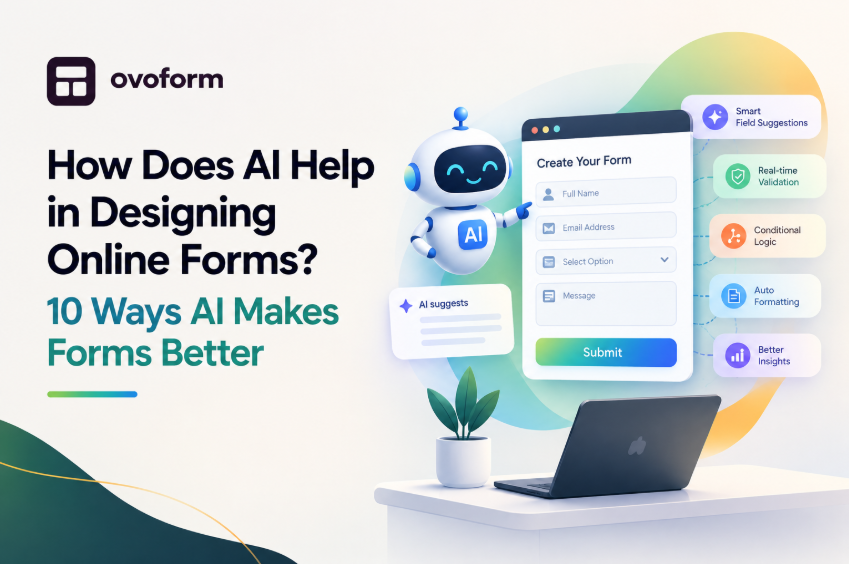
Designing an online form used to mean starting with a blank canvas, choosing every field manually, writing questions, arranging the layout, adding validation, and testing the final experience.
AI form design is changing that process.
Instead of building every form element from scratch, you can describe what you want in plain language and use AI to generate questions, recommend field types, organize the form, suggest conditional logic, improve wording, and identify opportunities to reduce friction.
In simple terms, AI helps with both creating and improving online forms. It can turn a basic idea into a structured first draft and help you refine that form for better usability, data quality, and completion rates.
In this guide, we'll explore how AI form builders help design online forms, where they provide the most value, and what you should still review before publishing.
Key Takeaways
AI can generate relevant form questions from a simple description.
It can recommend field types and organize questions into logical sections.
AI can improve unclear or overly complicated question wording.
It can suggest conditional logic to create more personalized forms.
AI can help identify unnecessary questions and reduce form friction.
It can support mobile-friendly and user-focused form design.
AI can help improve validation and the quality of collected data.
AI can analyze responses and identify opportunities to improve forms.
Human review is still essential for accuracy, usability, privacy, and compliance.
AI helps design online forms by automating many of the repetitive decisions involved in form creation.
Instead of manually deciding what to ask and how to structure every question, you can provide the form's purpose, audience, and requirements. AI can then generate a starting structure that you can review and customize. If you're weighing whether an AI-first builder makes sense for your team versus a traditional one, our Typeform vs Google Forms vs Ovoform comparison breaks that down in more detail.
Here are 10 ways AI can help.
One of the hardest parts of creating a form is deciding what information to collect.
If you start with a blank form, you have to determine:
What questions should be included?
Which information is actually necessary?
What should be asked first?
Which questions should be optional?
Are there any important questions missing?
AI can turn a simple objective into a list of relevant questions.
For example, instead of manually planning a client onboarding form, you could provide a prompt such as:
Create a client onboarding form for a digital marketing agency. Collect company information, website details, marketing goals, current challenges, budget, timeline, and preferred communication method.
AI can turn that description into a structured starting point containing questions such as:
Company name
Website
Industry
Team size
Primary marketing goal
Current marketing challenges
Monthly marketing budget
Project timeline
Preferred communication method
This doesn't mean every generated question should automatically be included. The purpose is to give you a useful first draft instead of making you start from zero.
A good form doesn't just ask the right questions. It uses the right input method for each question.
For example:
Information to collect | Appropriate field |
Email address | Email field |
Country | Dropdown |
Satisfaction | Rating scale |
Budget range | Multiple choice |
Project description | Long text |
Appointment date | Date picker |
Phone number | Phone field |
Choosing field types manually is simple for a short form but becomes repetitive when you're creating dozens of forms.
AI can recommend appropriate field types based on the information you're trying to collect.
For example, instead of creating a generic text field for:
How satisfied are you with our service?
AI may recommend a rating scale or multiple-choice question.
That can make responses easier for users to provide and easier for businesses to analyze.
The order of questions affects the user experience.
A form that jumps between unrelated topics can feel confusing even when every individual question is reasonable.
AI can help group related questions into sections such as:
Contact Information
Name, Email, Phone
Company Information
Company name, Industry, Team size
Project Details
Project type, Goals, Timeline, Budget
Additional Information
Comments, Attachments, Preferred communication method
This is particularly useful for longer forms, applications, onboarding questionnaires, and internal business processes.
The goal isn't simply to have fewer questions. It's to create a sequence that feels natural to the person completing the form - which sets up the next challenge: making sure each person only sees the questions relevant to them.
Small wording problems can make a form harder to complete.
Consider:
Tell us about your business.
It's open-ended and may produce very different answers.
A more specific question could be:
What industry does your business operate in?
Or instead of:
Tell us your requirements.
You might ask:
What is the primary goal you want to achieve with this project?
AI can help rewrite vague, repetitive, technical, or unnecessarily complicated questions. It can also help adjust wording for different audiences - a form intended for customers should generally use simpler language than an internal form created for a technical team.
Clearer questions can lead to more consistent responses and reduce the amount of interpretation required after submission.
Not every respondent needs to see every question. This is where conditional logic becomes important.
For example, imagine you're creating a customer support form.
A user selects:
What do you need help with?
Billing
Technical issue
Account access
Other
If the user selects Billing, the form can display billing-related questions. If they select Technical issue, the form can show questions about their device, software, or error message.
AI can help identify these relationships and suggest where conditional logic could make the form more relevant. This creates a more personalized experience because users only see questions that apply to them, and it can reduce unnecessary scrolling and make longer forms feel shorter.
This is particularly useful for lead qualification, customer onboarding, surveys, application forms, support requests, and registration workflows.
Because AI can generate questions quickly, it's easy to end up with a form containing 20 fields when you really need 8.
AI can help identify duplicate questions, similar questions, fields that may not be necessary, questions that could be combined, and information that could be collected later or gated behind conditional logic instead of asked upfront.
This is one area where human judgment matters most: before adding any field, ask "Do we actually need this information at this stage?" If the answer is no, remove it. A shorter, focused form will often outperform a comprehensive one that asks for everything upfront.
A form that looks fine on a large screen may feel frustrating on a phone if it contains long sections, small controls, poorly formatted fields, excessive scrolling, or large blocks of text.
AI can help identify potential usability problems and recommend ways to simplify the structure - breaking a long form into sections, replacing text inputs with dropdowns, shortening instructions, or using conditional questions to cut down on scrolling.
AI recommendations should still be tested on real devices before publishing. Good form design isn't just about what the form looks like in an editor - it's about how easily real people can complete it on the device they're actually using.
A well-designed form should collect information that stays useful after submission. Poorly designed fields can result in invalid email addresses, inconsistent phone numbers, missing information, or free-text answers that are difficult to standardize.
AI can help identify where validation or clearer instructions would help - for example, specifying "Enter your phone number, including the country code" instead of a bare "Phone number" label, or using an email-validated field instead of a generic text input.
The result is cleaner data that requires less manual correction - which matters most for businesses feeding form submissions directly into a CRM or automation workflow, since workflow automation only works well when the data going into it is consistent.
Different audiences don't always need the same form. A customer signing up for a free trial may need a short registration form, while a potential enterprise customer may need additional questions about company size, number of users, current software, implementation requirements, and timeline.
AI can help create different experiences based on the audience and purpose - starting with a general lead form and using conditional logic to ask additional questions only when they're relevant. This approach balances two competing goals: collecting enough information to make the submission useful, without making the form unnecessarily long.
AI's role doesn't have to end when the form is published. Once people start submitting responses, AI can help identify questions associated with high drop-off, repetitive or confusing questions, patterns in open-text responses, and data-quality issues.
This creates a more useful form-design cycle: Create → Publish → Collect → Analyze → Improve. Instead of designing a form once and leaving it unchanged, teams can continuously refine the experience based on actual usage.
AI doesn't completely replace traditional form builders. Instead, it changes where the design process begins.
Traditional form design | AI-assisted form design |
Start with a blank form | Start with a description or prompt |
Add fields manually | AI suggests fields |
Write questions yourself | AI can suggest and refine wording |
Choose field types manually | AI can recommend field types |
Organize sections yourself | AI can suggest a logical structure |
Build logic manually | AI can suggest conditional paths |
Review responses manually | AI can help identify patterns |
Optimize after problems appear | AI can suggest potential improvements |
The biggest advantage isn't that AI automatically creates a perfect form. It's that AI removes much of the repetitive groundwork, so you can spend more time reviewing the experience, understanding your audience, and making the form fit your workflow.
Here's what that looks like in practice.
Example: Designing a Customer Onboarding Form With AI
Imagine you're a SaaS company creating a new customer onboarding form. Instead of manually creating the form, you could start with a prompt:
Create a customer onboarding form for a B2B SaaS company. Collect company information, team size, current tools, implementation goals, timeline, and preferred communication method. Keep the form concise and use conditional questions where appropriate.
An AI form builder could generate a first draft containing:
Company Information — Company name, Website, Industry, Company size
Current Setup — Current software, Existing workflow, Main challenges
Implementation — Primary goal, Expected number of users, Implementation timeline
Communication — Preferred communication method, Additional comments
The AI-generated version is only the starting point. Your team can then remove questions that aren't necessary, change wording, add branding, configure conditional logic, and connect the completed form to the appropriate workflow — much faster than manually creating every field, while still keeping humans in control of the final design.
What AI Can't Do for You
AI can make form design faster, but it shouldn't be treated as the final decision-maker. A few things you still need to evaluate yourself:
AI doesn't automatically know your business requirements. A generic AI system doesn't know which information your team actually needs — a question can sound useful while providing little practical value.
AI can't replace user testing. A form may look logically structured but still be frustrating for real users. Test important forms with the people who will actually complete them.
AI doesn't guarantee compliance. If your form collects personal, financial, health, employee, or other sensitive information, you need to consider the legal and security requirements that apply to your organization. Don't assume an AI-generated form is automatically compliant.
AI can over-generate questions — More generated questions don‘t mean more necessary ones; always separate "nice to have" from "actually need."
Human review is still essential. The best workflow is not AI → Publish. It's:
AI → Review → Customize → Test → Publish → Improve
AI provides speed. Your team provides context and judgment.
How to Use AI Effectively When Designing an Online Form
The quality of the output depends partly on the quality of the instructions you give the AI. Instead of writing "Create a customer form," give it more context:
Create a short customer feedback form for a SaaS product. The goal is to understand customer satisfaction, identify problems, and collect feature requests. Keep it under 8 questions. Use multiple-choice questions where possible and include one optional open-text question. Make the language simple and friendly.
A strong prompt should ideally include:
The purpose — What are you trying to accomplish?
The audience — Who will complete the form?
The information you need — What decisions will the responses support?
The desired length — How many questions are appropriate?
The preferred experience — Conversational, concise, detailed, formal, or friendly?
Any special requirements — Conditional logic, file uploads, integrations, branding, validation.
The more context you provide, the more useful the initial form structure can be.
AI is particularly useful when you create forms frequently, need to build one quickly, don't want to start from a blank canvas, create similar forms for different campaigns, need help deciding what to ask, want to improve wording, build forms with conditional logic, need forms for different audiences, or want to analyze responses at scale.
It provides less value for a very simple form containing only one or two fields - if you only need Name + Email + Submit, there isn't much design work for AI to automate. The greater the complexity or frequency of your form creation, the more useful AI becomes.
Ovoform combines <mark>AI-assisted form creation</mark> with the tools needed to customize and manage online forms.
Instead of starting with a blank form, you can describe what you need and use AI to create a structured starting point. You can then edit the generated form, customize questions, configure logic, and adapt the experience to your workflow.
Ovoform also supports features beyond initial form generation, including templates, workflow automation, integrations, analytics, and other tools for managing the form lifecycle. See Ovoform pricing for plan details, including unlimited responses on every tier.
If you're creating forms regularly, the goal isn't simply to generate a form faster. It's to make the entire process - from idea to published form - simpler.
AI is changing online form design from a manual, blank-canvas process into a faster and more iterative workflow. Instead of spending time creating every field from scratch, teams can use AI to generate questions, organize the form, improve wording, recommend field types, personalize the experience, and identify opportunities to reduce friction.
But the goal isn't to let AI design everything without supervision. The strongest approach combines AI speed with human judgment: use AI to create the first draft, review it against your business goals, remove unnecessary questions, test the experience with real users, analyze the results, then keep improving the form.
That's where AI becomes more than a form-generation feature - it becomes part of the entire form-design and optimization process.
If you want to move from a form idea to a working online form faster, try creating your next form with Ovoform's AI form builder.
Create surveys, FAQs, and feedback forms in minutes with Ovoform — no code required.
Get started freeStart building with Ovoform today — free forever, no credit card required.
Get Started For Free