Surveys

Conditional logic transforms static forms into interactive conversations. By showing only relevant questions, it creates a cleaner experience for users, improves the quality of collected data, and supports more efficient workflows. Whether you're collecting enquiries, scheduling appointments, or qualifying leads, thoughtful conditional logic can make your forms feel faster, smarter, and easier to complete.
Nikhil Dogra
August 25, 2026
Think about the last time you filled out a long online form.
Maybe you were registering for a webinar, requesting a quote, or booking an appointment. Everything started well until the questions kept coming.
You were asked about services you didn't need.
You had to skip sections that didn't apply to you.
Some questions even felt repetitive.
By the end, you weren't just filling out a form, you were trying to figure out why it was asking all those questions in the first place.
Now imagine the opposite experience.
The form begins with a single question:
"What can we help you with today?"
You choose Book a Demo.
Immediately, the form changes. Questions about technical support disappear. Billing options are hidden. Instead, you're asked about your company, team size, and preferred meeting time.
The entire process feels effortless.
You don't notice the technology working behind the scenes, you simply notice that the form makes sense.
That's the power of conditional logic.
Rather than treating every visitor the same, conditional logic adapts your form based on each person's answers. It removes unnecessary questions, keeps the experience focused, and helps businesses collect more relevant information without overwhelming users.
Whether you're running a SaaS company, managing a healthcare clinic, hiring new employees, or collecting event registrations, conditional logic can turn an ordinary form into a much better experience.
In this guide, you'll learn what conditional logic is, why it matters, how to set it up, and how businesses use it to create forms people actually enjoy completing.
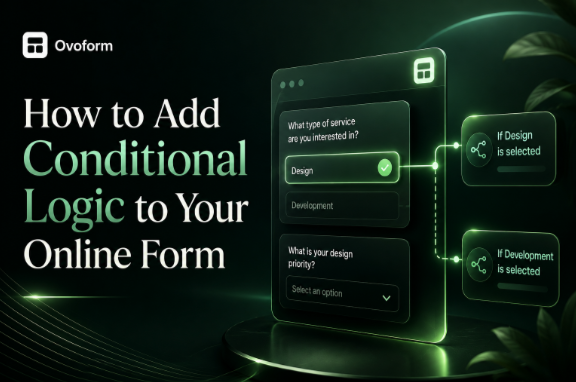
Conditional logic is a feature that allows your form to respond to a user's answers.
Instead of showing every possible question, the form displays only the fields that are relevant to that person's response.
Think of it as having a conversation.
If someone tells you they're looking for technical support, you naturally ask about the product they're using.
You wouldn't immediately ask for billing details or marketing preferences.
A good conversation follows context.
A smart form should do the same.
For example, imagine you're running an online fitness coaching business.
Your form starts with one simple question:
What's your goal?
Lose Weight
Build Muscle
Improve Fitness
If someone chooses Lose Weight, the form asks about eating habits and current activity levels.
If they choose Build Muscle, the next questions focus on gym experience and strength training.
The form hasn't become longer.
It's simply become more relevant.
Many businesses spend hours improving their website design but overlook one of the biggest reasons visitors leave the form itself.
A confusing or unnecessarily long form creates friction.
And friction causes hesitation.
Imagine you're looking for a home insurance quote.
The first page asks for your address.
That's expected.
Then it asks whether you own pets.
Next, it asks about commercial property.
Then agricultural buildings.
Then holiday homes.
None of those apply to you.
After a while, you start wondering if it's worth continuing.
Now compare that with a smarter experience.
The form first asks:
"What type of property would you like to insure?"
You select Residential Home.
Everything else disappears.
The experience feels quicker because you're only answering questions that matter.
That's exactly why conditional logic has become a standard feature in modern online forms.
Conditional logic isn't just about making forms look cleaner.
It improves the experience for both your visitors and your team.
Interestingly, conditional logic doesn't always reduce the total number of questions.
Instead, it reduces the number of questions each person sees.
Imagine your form contains thirty fields.
Without conditional logic, every visitor sees all thirty.
With conditional logic, most people may only answer ten or twelve.
The form instantly feels more manageable.
That small psychological difference can encourage more people to complete it.
People appreciate experiences that feel tailored to them.
Take a university application form as an example.
The first question asks:
What are you applying for?
Undergraduate
Postgraduate
Once the applicant chooses an option, the form adjusts automatically.
An undergraduate applicant isn't asked about previous research publications.
A postgraduate applicant isn't asked about school subjects.
Each person gets a form that matches their situation.
That's exactly how personalised experiences should work.
More questions don't necessarily mean better data.
In fact, they often create the opposite effect.
When people face long forms, they rush through answers, skip optional fields, or abandon the process entirely.
Conditional logic improves data quality by keeping every question relevant.
Imagine you're hiring for three different roles:
Software Developer
Graphic Designer
Content Writer
Instead of asking everyone for the same portfolio, your form changes based on the selected role.
Developers share GitHub.
Designers share Behance.
Writers upload published articles.
Everyone provides information that's actually useful.
Conditional logic becomes even more powerful when combined with automation.
Let's say a visitor selects:
"I need technical support."
Instead of sending that enquiry to your sales inbox, your form automatically routes it to the support team.
If someone requests a product demo, the submission can trigger a confirmation email and notify your sales team.
Modern form builders including platforms like Ovoform make it possible to combine conditional logic with workflows, CRM integrations, and automated notifications, helping teams respond more efficiently without adding manual work.
The visitor enjoys a smoother experience.
Your team saves time.
Everybody wins.
One mistake businesses often make is jumping straight into creating rules.
Instead, start with a simple question:
"What decision is my visitor making?"
Every successful conditional form begins with a decision.
For example:
A recruitment form begins with:
Which position are you applying for?
A medical form begins with:
Are you a new or returning patient?
An event registration form begins with:
Will you attend in person or online?
These opening questions guide everything that follows.
Think of them as the starting point of a conversation.
Once you know the visitor's intent, every next question becomes easier to determine.
Now that you understand why conditional logic matters, let's build one.
The exact interface will vary depending on your form builder, but the process is remarkably similar across most modern platforms.
Think of it less like programming and more like planning a conversation.
You're simply deciding:
"If someone gives this answer, what should they see next?"
Once you start thinking that way, creating conditional logic becomes much easier.
Every smart form begins with one important question.
Instead of asking for lots of information straight away, ask something that helps you understand the visitor's needs.
For example, imagine you own a digital agency.
Rather than showing every service you offer, your first question could be:
What can we help you with?
Website Design
SEO
Google Ads
Branding
That single answer immediately tells the form what information is relevant.
The visitor only sees questions related to the service they've selected.
It feels less like filling out paperwork and more like having a conversation.
Before creating any rules, build every field your form might use.
For a project enquiry form, that could include:
Name
Email Address
Company Name
Service Required
Project Budget
Website URL
Preferred Timeline
Additional Information
Don't worry if some people never see certain fields—that's exactly what conditional logic is for.
This is where your form becomes dynamic.
Most form builders use simple If → Then rules.
For example:
If the visitor selects Website Design
Then show:
Existing Website
Number of Pages
Design Inspiration
If they select SEO
Show:
Current Website
Monthly Website Traffic
Primary SEO Goals
Instead of forcing everyone through the same journey, the form adapts naturally.
One of the biggest mistakes businesses make is publishing a form without testing every possible journey.
Imagine someone changes their answer halfway through.
Does the form update correctly?
Do hidden questions disappear?
Can they still submit the form without errors?
Always test your form as if you're a real visitor.
Complete it several times using different answers.
Check it on a desktop.
Then check it again on your phone.
A form that looks perfect on a large screen may behave differently on mobile.
Conditional logic isn't limited to one industry.
It's useful anywhere different users need different experiences.
Here are a few examples.
A patient visits a clinic's website to book an appointment.
The form begins with one simple question.
Have you visited us before?
New Patient
The form asks for:
Medical History
Insurance Details
Emergency Contact
Returning Patient
Instead, they're asked for:
Patient ID
Preferred Appointment Time
The returning patient finishes the form much faster because they aren't asked to repeat information the clinic already has.
Imagine you're hiring for five different positions.
Without conditional logic, every applicant would see every question.
That quickly becomes confusing.
Instead, the form asks:
Which role are you applying for?
A developer is asked for:
GitHub Profile
Programming Languages
Technical Experience
A designer sees:
Portfolio
Design Software
Creative Projects
A marketing applicant uploads campaign examples instead.
One form.
Multiple personalised experiences.
A conference organiser asks:
How will you attend?
In Person
Online
If someone chooses Online, there's no need to ask about parking, dietary requirements, or hotel accommodation.
Those questions stay hidden.
The registration process feels significantly shorter.
A software company receives hundreds of demo requests every month.
Instead of asking everyone the same questions, the form begins with:
How many employees work at your company?
Small businesses are shown questions about getting started.
Enterprise organisations are asked about:
CRM integrations
Security requirements
Team size
Implementation timeline
Sales representatives receive better-qualified enquiries before the first meeting even begins.
Adding conditional logic is only half the job.
Using it well is what creates a great experience.
You don't need dozens of conditions.
In fact, too many rules often create confusion.
If your logic is becoming difficult to explain to a colleague, it's probably becoming difficult to maintain too.
Start simple.
You can always improve it later.
Compare these two questions.
Select Service Category
or
What can we help you with today?
The second feels warmer.
More natural.
Remember, forms are conversations—not databases.
Every extra question asks for another small commitment.
If you don't need someone's phone number today, don't ask for it.
If you already know their country, don't ask again later.
Respect your visitor's time.
They'll appreciate it.
Conditional logic shouldn't stop after someone clicks Submit.
Think about what should happen behind the scenes.
Should the enquiry go to sales?
Should support receive it?
Should the visitor receive a confirmation email?
Many modern form builders including Ovoform allow you to combine conditional logic with automations, helping enquiries reach the right people without additional manual work.
Even well-designed forms can create frustration if conditional logic isn't planned carefully.
More rules don't always create a better experience.
Keep the journey easy to follow.
If someone already selected their service at the beginning of the form, don't ask them again later.
Every question should have a purpose.
Most visitors won't complete your form from a desktop computer.
Always test how your conditional fields appear on mobile devices.
Businesses change.
Services evolve.
Your forms should evolve too.
Review your conditional logic every few months to make sure it still reflects the way your business works today.
The best online forms aren't the ones with the fewest questions—they're the ones that ask the right questions at the right time.
Conditional logic helps remove unnecessary steps, reduces friction, and creates a smoother experience from the first click to the final submission. Visitors spend less time scrolling through irrelevant fields, while businesses receive more accurate and useful information.
If you're creating a contact form, booking form, job application, or customer survey, start with one simple decision and build the rest of the journey around it. Small improvements like these often make a bigger difference than redesigning an entire page.
Create surveys, FAQs, and feedback forms in minutes with Ovoform — no code required.
Get started freeStart building with Ovoform today — free forever, no credit card required.
Get Started For Free