Surveys

An effective online registration form template helps organizers collect participant details, manage sign-ups, and simplify event planning without building forms from scratch. This guide explores templates for workshops, classes, webinars, fundraisers, conferences, and community events, along with essential fields, customization best practices, conditional logic, privacy considerations, and tips for creating a smoother registration experience.
Nikhil Dogra
October 19, 2026
A nonprofit coordinator is organizing a charity run for the first time. She has two weeks, a small team, and very little budget. She opens a blank document and starts writing questions: name, phone number, age, and T-shirt size. Then she remembers emergency contacts. Volunteers need different questions from runners, and people registering as teams need another set of details.
By the end of the day, she has several unfinished forms and still isn't sure which one to share.
This is a common problem for people organizing events. The event itself may be well planned, but collecting registrations can quickly become another project. Building every form from scratch takes time, and missing one important question can create unnecessary work later.
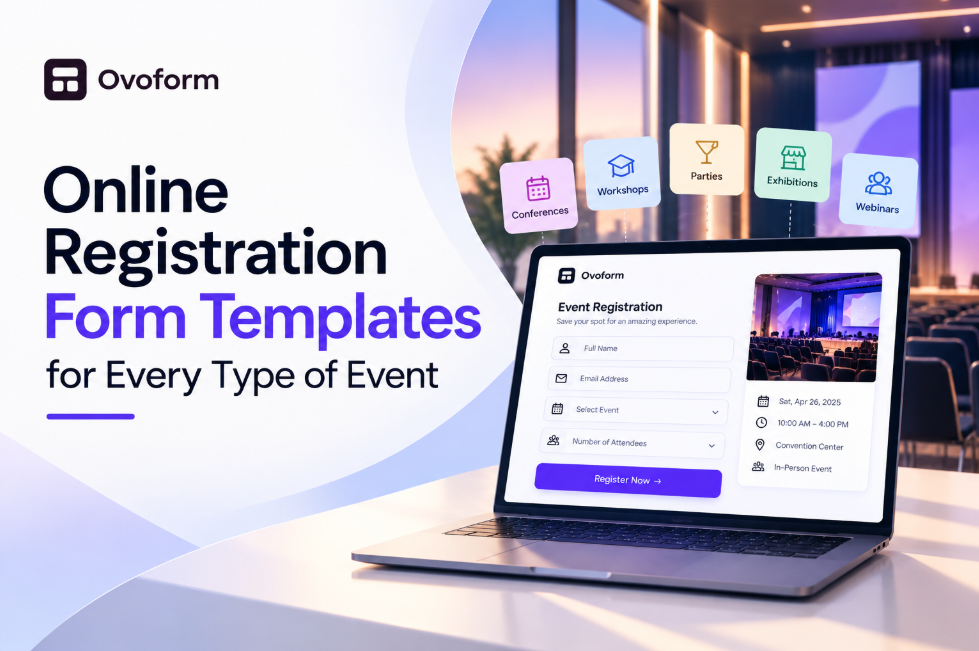
An online registration form template gives you a practical starting point. Instead of deciding every field and layout yourself, you can begin with a structure designed for a similar purpose and adjust it to suit your event.
Whether you're organizing a workshop, school class, fundraiser, conference, or community gathering, this guide explains which template to choose, what information to collect, and how to make registration easier for everyone involved.
An online registration form template is a ready-made form that people can complete to sign up for an event, class, program, or activity. It usually includes common fields, an organized question flow, and space for event-specific details.
For example, an event registration form template can provide a starting structure for collecting participant details, attendance preferences, and session choices. A class registration form may need student details and parent or guardian contact information, while a volunteer registration form may ask about availability, preferred responsibilities, and relevant experience.
Templates can be especially helpful for small organizations that need a free registration form or want to launch an online sign-up form without hiring a developer.
However, a template is a starting point, not a complete event-management system. Features such as payment processing, live capacity tracking, waitlists, and automatic reminders depend on the form builder and any connected tools.
A blank form gives you complete freedom, but it also leaves every decision to you. You must decide which questions matter, how to arrange them, which fields should be required, and what participants should see after submitting their information.
A suitable template takes care of much of that initial structure.
It saves preparation time. You can begin with a relevant layout instead of writing every question yourself.
It helps you remember important details. A good starting point may include contact information, session preferences, consent, or other fields you might otherwise overlook.
It creates a more consistent experience. Participants are more likely to understand a form when questions follow a logical order and instructions are clear.
It makes future events easier to organize. Once you've customized a form for a recurring class or workshop, you can reuse the structure and update the details.
It reduces unnecessary administration. Collecting responses in one organized place is easier than combining information from paper sheets, emails, phone calls, and messages.
The important word is suitable. A template designed for a conference may be too complicated for a small community meetup. Choose one that matches your event, then remove anything that doesn't serve a clear purpose.
Although events differ, most registration forms need a few basic elements.
Put the event name, date, time, location or joining link, and any applicable fee near the beginning. Include the intended audience and any important eligibility requirements. Participants should understand what they're signing up for before providing personal information.
For most events, a name and email address are enough to get started. A phone number may be useful when organizers need to contact participants urgently or coordinate on the day.
Avoid collecting extra personal details simply because your template includes them.
Ask about session choices, ticket types, class levels, dietary preferences, accessibility requirements, or volunteer availability when these details affect the event.
Where relevant, explain cancellation terms, a code of conduct, photography permissions, or other conditions. Make the wording understandable and obtain the appropriate consent rather than relying on an unclear checkbox.
Paid events may require a payment step, while free events may only need a confirmation message. Check that your chosen tool supports the required payment or notification workflow.
After submission, tell participants what happens next. If their place is confirmed immediately, say so. If the organizer must review the application first, explain that the registration is pending.
Workshops often have limited seats and may run several sessions throughout the day. A workshop registration form should collect the participant's name, email address, organization where relevant, and preferred session.
For professional training, you might also ask about experience level or what participants hope to learn. Avoid requesting detailed background information unless it helps you prepare the session.
If you're comparing tools for managing registrations, this guide to event registration form builders can help you evaluate the available options.
If you're organizing several batches, make the available options easy to distinguish. A seat limit or waitlist can be useful, but only if the platform supports reliable capacity management.
Schools, tuition centers, fitness studios, and art instructors often need a class registration form for recurring programs.
Useful fields include the student's name, age or grade when relevant, preferred class, and parent or guardian contact details for minors. You may also need a start date, schedule preference, or information about accessibility requirements.
Collect medical information only when there is a legitimate need and a clear process for protecting it. For recurring classes, explain how participants will receive schedules, updates, and any additional instructions.
Online events usually benefit from a short form. A name and email address may be sufficient for a free webinar, while a paid or specialized session may require additional details.
After registration, provide the joining instructions and explain when participants will receive the link. If you plan to send a recording afterward, tell registrants in advance.
Avoid asking questions that don't help you run the event or improve the participant's experience. The simpler the sign-up process, the easier it is for someone to register while browsing on a phone.
Charity runs, fundraising dinners, and community donation drives often involve different participant groups.
A charity run may require the participant's name, chosen distance, T-shirt size, and an emergency contact. A fundraising dinner may need ticket type, guest count, and meal preferences. A separate volunteer registration form can collect availability, preferred tasks, and relevant experience without making ordinary attendees answer unnecessary questions.
Don't combine every requirement into one long questionnaire. Separate forms or conditional questions can help each group provide only the information relevant to them.
Conferences may involve several ticket categories, parallel sessions, speakers, sponsors, and exhibitors.
Start with contact details and ticket selection. Then ask about session preferences, organization, job title, or dietary requirements when those details are useful.
Conditional questions can make a significant difference. For example, speakers may need to submit a presentation title, while ordinary attendees do not. A well-designed form keeps those additional questions hidden from people who don't need to answer them.
Meetups, local festivals, neighborhood gatherings, and club activities usually need a lightweight form.
Collect a name, contact method, attendance details, and guest count if people can bring others. Ask about accessibility or other arrangements that the organizers genuinely need to plan for.
For free community events, make the registration process especially straightforward. Participants should not have to complete a lengthy questionnaire just to attend an informal gathering.
Youth camps and sports programs may require more information because organizers need to plan activities and respond to emergencies.
Depending on the program, fields may include participant age, parent or guardian contact, emergency contact, relevant medical information, and consent documentation.
Collect sensitive information only when necessary, restrict access to staff who need it, and explain how it will be used. Check any applicable requirements for parental consent, waivers, and safeguarding before publishing the form.
Remove unnecessary questions. A template is not a checklist of mandatory fields. Delete anything that doesn't help you organize the event or communicate with participants.
Make essential fields obvious. Mark required questions clearly, and leave optional questions optional. Participants should be able to tell what they must complete.
Use conditional logic. Show extra questions only when they apply. For example, a volunteer might see a question about preferred tasks, while a regular attendee does not. This guide to conditional logic in forms explains how conditional questions can make a form more relevant to each participant.
Keep the form accessible. Use clear labels, readable text, meaningful error messages, and a layout that works with a keyboard and assistive technologies. Test it on a phone as well as a computer.
Explain privacy and consent. Tell people why you're collecting their details and how you intend to use them. Registration for an event should not automatically mean consent to unrelated marketing messages.
Test the complete process. Submit a test registration, check the response record, review the confirmation message, and verify any payment or notification steps before sharing the form publicly.
Review form completion. If people start registering but do not finish, the form may be too long or unclear. These ways to improve form completion rates offer practical ideas for reducing unnecessary friction.
Use this checklist as a starting point, then adapt it to your event.
Essential fields
Event name, date, time, and location or joining link
Participant name
Email address or another appropriate contact method
Ticket, session, or class selection where applicable
Confirmation message and next steps
Add when relevant
Organization or job title
Number of guests or team members
Dietary or accessibility requirements
Volunteer availability and preferred tasks
Parent or guardian contact details for minors
Consent or policy acknowledgment
Payment details for paid events
Before sharing the form
Remove questions you will not use.
Check that the form works on mobile.
Test the confirmation message.
Verify payment and capacity features if needed.
Explain how participant information will be used.
Confirm whether registrations are automatically accepted or require approval.
Not every event needs every field. A free webinar may need only a name and email address, while a youth camp may require additional safety information. Let the event determine the form rather than making every participant answer the same long list of questions.
Start with the event itself. List the information you need before, during, and after registration. Then choose a template that matches the event type and covers the essentials without introducing unnecessary questions.
Next, customize the event details, fields, instructions, and confirmation message. If your event has multiple participant categories, decide whether separate forms or conditional questions will make the process clearer.
For informal gatherings where you mainly need to know who is attending, an RSVP form template may be more appropriate than a detailed conference registration form.
Review the features you actually need. A small free workshop may require only a simple online sign-up form. A paid conference with limited capacity may need payment processing, registration tracking, and a dependable way to manage full sessions. Confirm that the platform supports these features before relying on them.
A form builder such as Ovoform can help you customize forms without coding. Choose features based on the workflow you need rather than assuming every template includes advanced event-management capabilities. If your process relies on external tools, review the available Ovoform integrations and confirm that they support your intended setup.
Before publishing, submit a test response on mobile and desktop. Check the confirmation, ensure the data reaches the right place, and make sure participants know whether their registration is confirmed or still awaiting approval.
After the event, compare registrations with actual attendance. Review which questions were useful, where participants had trouble, and what should change next time. That small review will make the next registration form easier to prepare.
An online registration form template is more than a shortcut. It gives you a starting structure for collecting the information an event needs without making participants work through unnecessary questions.
The best template depends on the people registering and the event you're organizing. A class, a charity run, and a professional conference each have different requirements, so customize the fields rather than using the same form for everyone.
Start with the essentials, explain what happens after submission, protect the information you collect, and test the process before sharing it. A thoughtful registration form won't solve every event-planning challenge, but it can remove a surprising amount of avoidable administration.
Create surveys, FAQs, and feedback forms in minutes with Ovoform — no code required.
Get started freeStart building with Ovoform today — free forever, no credit card required.
Get Started For Free