Surveys

Conditional logic makes forms more relevant by showing users only the questions that apply to them. This can reduce friction, improve the user experience, and help businesses collect more relevant data. By keeping logic simple, testing each path, and using branching only where it adds value, businesses can create smarter forms that are easier to complete.
Ovoform Team
August 14, 2026
Picture this.
You're filling out an online form to book a consultation. The first few questions are simple enough, but then the form starts asking about your company, your team size, your budget, your preferred software, and even details that don't apply to you.
You pause for a second.
"Why am I answering questions that aren't relevant?"
It's frustrating, and for many people, that's the moment they decide to close the page.
Now imagine a different experience.
You answer one question.
"Are you applying as an individual or a business?"
You choose Individual.
Instantly, every business-related question disappears.
The form suddenly feels shorter, easier, and much more personal.
That's the power of conditional logic.
Instead of making everyone answer the same long list of questions, conditional logic shows only the questions that matter. The result is a smoother experience for users and better-quality data for businesses.
In this guide, you'll learn what conditional logic is, why it improves form completion rates, and how to use it effectively to build forms people actually enjoy filling out.
Conditional logic is a feature that changes a form based on a user's answers.
Rather than displaying every question at once, the form automatically shows or hides fields depending on previous responses.
Think of it like a conversation.
If someone says they don't own a business, there's no reason to ask for a company name.
If they're not attending an event, there's no need to ask for dietary preferences.
The form adapts as users move through it, making the experience feel quicker and more relevant.
Conditional logic doesn't remove questions from the form itself. It determines which questions each user sees based on their previous answers. A form may contain 20 possible questions, but one user might only see 8 of them. This makes the form feel shorter without sacrificing the information the business needs.
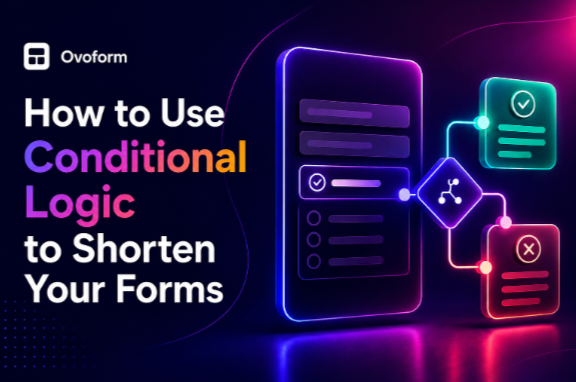
Conditional logic typically follows an if-then rule. A user's answer triggers a specific action, such as showing a follow-up question, hiding a section, skipping to another part of the form, or ending the form.
For example:
If "Are you applying as a business?" = Yes
Then show company name, company size, and business requirements.
If = No
Then skip those questions and continue to the next relevant section.
This approach allows one form to support different user journeys without showing every question to every visitor.
Most people don't mind answering questions.
What they dislike is answering unnecessary ones.
Imagine opening a contact form with 25 required fields. Before you've even started typing, it already feels like work.
That's often enough to make visitors leave.
Long forms can lead to:
Higher abandonment rates
Lower conversion rates
Poor mobile experience
User frustration
Incomplete or inaccurate information
The longer a form appears, the more likely people are to give up before reaching the submit button.
Here's the interesting part.
Conditional logic doesn't always reduce the total number of questions in your form.
It reduces the number of questions each individual user sees.
That small change makes a huge difference.
Instead of asking everyone every possible question, your form creates a personalised journey for each visitor.
People spend less time completing the form, answer only relevant questions, and are far more likely to finish it.
It's a better experience for users—and a smarter way to collect data.
An agency wants to onboard new clients.
The first question asks:
What service are you interested in?
Website Design
SEO
Paid Advertising
If someone selects SEO, they'll only see SEO-related questions.
There's no need to ask about website redesign or advertising budgets.
A recruitment form asks:
Do you have previous work experience?
If the answer is Yes, the form requests employment history.
If the answer is No, those questions are skipped, and the applicant moves straight to education details.
The process feels much faster for students and first-time job seekers.
A patient selects:
Do you have any allergies?
If they choose No, the allergy section stays hidden.
If they select Yes, additional questions appear asking for details.
The form stays simple while still collecting important information when needed.
A registration form asks:
Will you attend the networking dinner?
If the answer is Yes, the form displays dietary preference options.
If the answer is No, those questions never appear.
Simple, relevant, and user-friendly.
People appreciate forms that respect their time. Showing only relevant questions keeps users focused and can make the form easier to navigate from start to finish.
By reducing unnecessary questions and form friction, conditional logic can make the experience easier to complete. The actual impact will depend on the form, audience, and overall user experience.
When users answer only relevant questions, businesses receive cleaner and more accurate information.
Users spend less time navigating questions that don't apply to them. This can be particularly helpful on mobile devices, where completing long forms can be more cumbersome.
Conditional logic makes forms feel like conversations instead of questionnaires. That personalisation can make the experience feel more relevant and reduce unnecessary friction.
Before creating the form, map out the main questions, possible answers, and follow-up paths.
A simple flowchart or decision tree can help identify unnecessary branches and prevent conflicting rules.
Use the first few questions to understand who your user is.
Their answers can guide the rest of the form.
Avoid creating dozens of complex rules.
If your logic becomes difficult to follow, it can confuse both users and your team.
Always check that each answer displays the correct follow-up questions.
Test every possible path before publishing. Broken logic can lead to incomplete submissions or poor user experiences.
Only use conditional logic for optional or situation-specific questions.
Everyone should still see the essential fields required to complete the form.
Make sure hidden sections load smoothly and buttons remain easy to tap.
Test the complete form on different screen sizes before publishing.
Conditional logic works best for forms that collect detailed information without overwhelming users.
It's especially useful for:
Client onboarding forms
Lead generation forms
Healthcare intake forms
Recruitment applications
Event registrations
Insurance enquiries
Financial services
Customer support requests
If every user needs to answer the same three or four questions, conditional logic probably isn't necessary.
Asking unnecessary questions before using logic
Creating overly complicated branching paths
Forgetting to test hidden fields
Making required questions disappear accidentally
Using conditional logic for very short forms
Not every form needs branching. If a form is already short and most users need to answer the same questions, adding unnecessary logic can make the form harder to build and maintain.
The goal is to simplify the experience, not make it more confusing.
Great forms don't just collect information, they respect the user's time.
Conditional logic is one of the simplest ways to make that happen. Instead of presenting every visitor with a long list of questions, it creates a journey that's relevant, efficient, and easy to follow.
Whether you're capturing leads, onboarding clients, or managing registrations, showing only the questions that matter helps people complete forms with less effort and gives your business cleaner, more meaningful data.
The best forms don't feel like forms at all they feel like conversations.
Ready to create forms that work smarter, not harder?
With Ovoform, you can build intelligent forms using conditional logic, multi-step workflows, AI-powered features, and automation—all without writing code. Give your users a faster, more personalised experience while collecting cleaner, more actionable data.
Create surveys, FAQs, and feedback forms in minutes with Ovoform — no code required.
Get started freeStart building with Ovoform today — free forever, no credit card required.
Get Started For Free