Form Builders

Learn how AI form builders help businesses create forms faster using intelligent prompts, automate workflows, and improve data collection. This guide covers key benefits, real-world use cases, tips for choosing the right platform, and how Ovoform simplifies AI-powered form creation.
Ovoform Team
July 3, 2026

A marketing manager creating a webinar registration form, an HR team preparing a job application, or a customer success team building a feedback survey often runs into the same problem: they've built a version of this form before, yet they're still starting from a blank page.
An AI form builder changes that starting point. Describe what you need in plain language "create a client onboarding form for a digital marketing agency", and the platform generates a structured draft with relevant fields, logical sections, and suggested field types. What used to take 30 minutes to an hour can be done in a few minutes.
In this guide, you'll learn how AI form builders work, when they add the most value, how they compare with traditional form builders, and what to look for when choosing one for your business.
Most businesses don't create just one form. They create dozens.
A small agency might need to lead capture forms, client onboarding questionnaires, project briefs, and feedback surveys. An HR team manages job applications, leave requests, and employee satisfaction surveys. Marketing teams regularly build forms for webinars, downloadable resources, contests, and event registrations.
Although these forms serve different purposes, the process often looks the same:
Open a blank form
Decide which questions to ask
Rearrange fields
Add validation rules
Test the layout
Make revisions after feedback
Much of this work is repetitive. Teams aren't solving a new problem each time; they're recreating similar forms with minor changes.
That repetition is exactly what AI is built to cut out.
An AI form builder is software that generates forms from natural language instructions instead of requiring users to add every field manually.
You describe the form's purpose, and the AI suggests relevant questions, appropriate field types, and a logical structure. For example:
"Create a customer onboarding form for a digital marketing agency collecting company details, website information, marketing goals, monthly budget, and preferred communication method."
Within seconds, you have a structured draft to review, edit, and publish, not a blank canvas.
This is especially useful for businesses that create forms regularly but don't want to repeat the same setup process from scratch each time. See how Ovoform's AI form generator handles this in practice.
Both approaches help you create online forms, but they solve different problems.
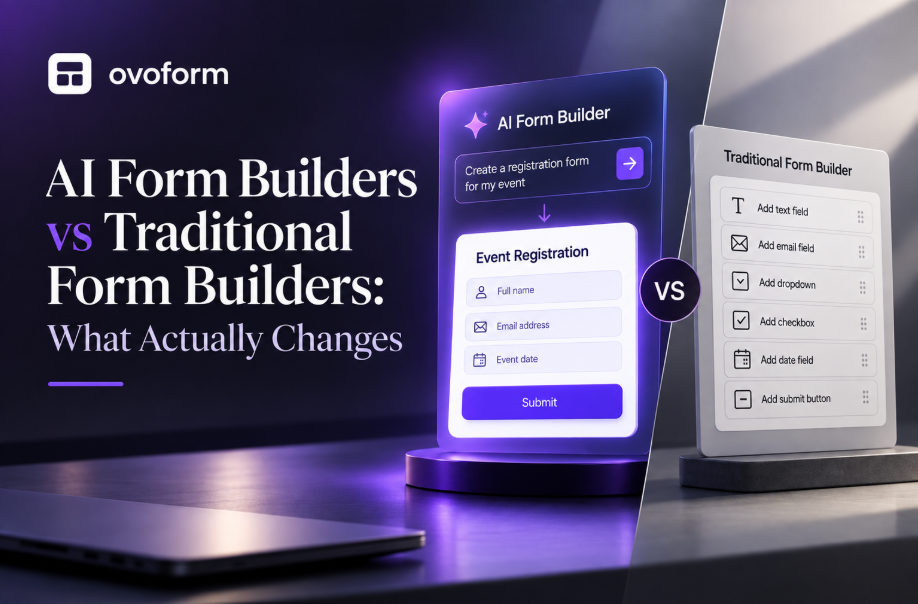
A traditional form builder gives you complete control from the beginning. An AI form builder helps you reach that starting point much faster.
Traditional Form Builder | AI Form Builder |
Start with a blank form | Start with a text prompt |
Add every field manually | AI generates a first draft |
Decide question order yourself | AI suggests a logical structure |
Manual wording | AI recommends clearer questions |
Longer setup time | Faster initial creation |
Best for highly customized forms | Best for repetitive or new forms |
The advantage of AI isn't that it automatically creates better forms. It's that it removes the repetitive groundwork, giving teams more time to refine the experience rather than assembling it.
The key advantage of an AI form builder is that it eliminates repetitive tasks that slow teams down. Instead of spending time on field selection and form structure, you can start with a solid draft and focus on refining it for your audience.
Here are the benefits businesses notice most.
Traditional form creation usually begins with an empty page. You write the title, add fields one by one, organize sections, configure validation, and test before publishing.
With an AI form builder, you describe your objective and get a structured draft. A supplier onboarding form that would normally take an hour to build can be drafted, reviewed, and published in a fraction of that time.
For teams creating multiple forms every month, that reduction in setup time compounds quickly.
A form is only as useful as the information it collects.
AI helps improve question quality by suggesting clearer wording and logically grouping related fields. Instead of a vague prompt like "Tell us about your business," an AI-generated draft might offer:
What industry does your business operate in?
Approximately how many employees do you have?
What is your primary business goal over the next 12 months?
The result is more structured responses that are easier to review and act on.
When multiple people create forms, the output varies; one employee writes a three-question feedback survey while another builds a fifteen-question version collecting the same information.
AI helps standardize the starting point. Teams refine from a consistent structure rather than reinventing it each time. This matters most for agencies, HR departments, franchises, and any team where forms are created by more than one person.
Long or confusing forms are one of the biggest reasons people stop before clicking Submit.
AI can help reduce unnecessary complexity by:
Removing duplicate questions
Suggesting better field order
Grouping related information
Recommending conditional logic
Keeping forms focused on the stated objective
For example, a webinar registration form probably doesn't need ten demographic questions before someone can reserve a seat.
Keeping forms concise improves the overall experience.
Marketing teams often work against tight deadlines.
Imagine you're launching:
A webinar
A product waitlist
A customer survey
A giveaway campaign
A beta program
Instead of spending an hour creating a registration form, AI can generate one almost immediately, allowing your team to focus on promotion rather than setup.
AI-generated forms also create a better starting point for collaboration.
Instead of reviewing an empty draft, marketing, sales, HR, or operations teams can review an AI-generated version together and suggest improvements.
This speeds up approval cycles because everyone begins with something tangible instead of discussing ideas in abstract.
AI form builders aren't limited to one industry. They solve a common problem across different teams: creating forms quickly without sacrificing quality.
Here are some of the most common business use cases.
Marketing teams regularly create forms for:
E-book downloads
Webinar registrations
Demo requests
Newsletter sign-ups
Contest entries
Landing pages
AI generates these from a campaign objective instead of from scratch, so teams can focus on promotion rather than form setup.
Collecting customer feedback should be easy for both businesses and customers.
AI can generate surveys for:
Product feedback
Net Promoter Score (NPS)
Support experience
Feature requests
Post-purchase reviews
Rather than using generic templates, businesses can tailor surveys to specific products or services with minimal effort.
HR teams create many repetitive forms throughout the employee lifecycle.
Examples include:
Candidate screening questionnaires
Employee onboarding
Training feedback
Instead of recreating these documents every hiring cycle, AI provides a reusable starting point.
Client Onboarding
Service businesses often ask new clients similar questions.
These may include:
Company information
Project goals
Budget
Brand guidelines
Existing tools
Key contacts
An AI-generated onboarding form captures this in a structured format that replaces lengthy email back-and-forth.
Planning an event usually involves collecting more than just names and email addresses.
Depending on the event, organizers may need:
Ticket type
Company details
Dietary preferences
Session selection
Accessibility requirements
Payment information
AI generates a registration form from the event description, so organizers aren't building fields one by one. Ovoform's event registration form template is a good starting point for most event types.
Internal Operations
Many businesses also use AI-generated forms internally.
Examples include:
IT support requests
Equipment requests
Purchase approvals
Expense claims
Facility maintenance requests
AI-generated internal forms reduce confusion and create a consistent record of requests.
What AI Can - and Can't - Do
Understanding where AI adds value and where it doesn't is important before committing to a platform.
AI can:
Generate a complete first draft from a text prompt
Suggest relevant questions and field types
Recommend logical section groupings
Help improve question clarity
Speed up the creation of repetitive forms
AI can't:
Understand your internal compliance or approval rules
Know which information is genuinely necessary for your specific workflow
Replace testing with real users
Guarantee the form is legally compliant
Every AI-generated form should be reviewed before publishing. The best results come from combining AI's speed with human knowledge of your audience and business goals.
AI is becoming a standard feature in many form-building platforms, but not every solution offers the same level of intelligence or usability. Some tools simply generate a basic form from a prompt, while others help you optimize questions, automate workflows, analyze responses, and continuously improve your forms.
Before choosing an AI form builder, consider how it will fit into your team's daily workflow rather than focusing only on the AI feature itself.
The best AI form builders don't just create a list of random questions; they understand the context of your request.
For example, if you ask for:
"Create a customer onboarding form for a SaaS company."
A capable AI should generate fields such as:
Company information
Team size
Current software
Business goals
Primary contact
Implementation timeline
If the generated form requires extensive rewriting every time, the AI isn't saving you much time.
AI creates a starting point, not locking you into a fixed structure.
Look for a platform where you can easily:
Add or remove questions
Rearrange sections
Edit field types
Apply branding
Configure conditional logic
Preview changes instantly
The easier it is to customize AI-generated forms, the more useful the platform becomes.
Creating the form is only the first step.
Think about what happens after someone clicks Submit.
Can the platform automatically:
Send confirmation emails?
Notify the right team member?
Update your CRM?
Trigger project management tasks?
Export responses?
Route submissions based on answers?
A good AI form builder should support the entire workflow, not just the form itself.
AI-generated forms often collect sensitive customer or employee information.
Before selecting a platform, review:
Data encryption
GDPR compliance
User permissions
Audit logs
Spam protection
Secure data storage
As your business grows, these features become just as important as ease of use.
Your first AI-generated form may be simple, but your needs are likely to grow.
Choose a platform that can support:
Multiple team members
Increasing response volumes
Advanced workflows
More complex forms
Future integrations
Switching platforms later can be time-consuming, so it's worth choosing one that can scale with your business.
Before committing to a platform, ask yourself:
✔ Can it generate useful forms from natural language prompts?
✔ Are AI-generated questions relevant and well-structured?
✔ Can forms be edited without technical knowledge?
✔ Does it support conditional logic?
✔ Can it automate workflows after submission?
✔ Is it mobile-friendly?
✔ Does it integrate with your existing tools?
✔ Does it meet your security and compliance requirements?
✔ Will it scale as your business grows?
If you're evaluating Ovoform, you can test the AI form generator without a credit card, describe the form you need, and see the draft before committing to a plan.
AI can save significant time, but it's not a substitute for understanding your audience or business processes.
Here are some common mistakes to avoid.
AI can generate an excellent first draft, but it doesn't know your internal processes, legal requirements, or brand voice.
Always review every question before publishing.
Because AI can generate comprehensive forms quickly, it's tempting to include every suggested question.
Instead, ask yourself:
"Do I actually need this information right now?"
Shorter forms generally provide a better user experience.
One of the easiest ways to improve a form is by hiding questions that aren't relevant.
Use conditional logic to personalize the experience and reduce unnecessary scrolling.
Many respondents will complete your forms on a smartphone.
Always preview AI-generated forms on multiple screen sizes before making them live.
AI is a productivity tool, not an automatic decision-maker.
The best forms combine AI-generated structure with human knowledge of customers, workflows, and business goals.
AI is already reducing the time it takes to create forms, but its role is expanding beyond generation.
In the coming years, AI is expected to help businesses:
Recommend questions based on previous responses
Detect incomplete or confusing forms before publishing
Suggest improvements to increase completion rates
Summarize open-text responses automatically
Identify trends across thousands of submissions
Trigger intelligent workflow automation based on customer intent
Rather than acting as a standalone feature, AI will increasingly become part of the entire data collection process, from form creation to response analysis and follow-up actions.
Businesses that adopt these capabilities early can spend less time managing forms and more time acting on the information they collect.
AI isn't replacing form builders; it's making them faster, smarter, and easier to use. Instead of spending time building every form from scratch, businesses can generate a strong first draft, refine it to match their needs, and focus on what matters most: collecting accurate information and delivering a better experience for respondents.
Whether you're launching a marketing campaign, onboarding new clients, collecting customer feedback, or streamlining internal workflows, the right AI form builder can help your team save time, improve consistency, and reduce repetitive work.
If you're ready to experience AI-powered form creation, Ovoform helps you turn simple prompts into professional forms in minutes. From AI-assisted form generation and content optimization to multilingual support, workflow automation, and actionable insights, it's designed to simplify every stage of the form creation process.
Start building smarter forms today with Ovoform AI and see how quickly you can go from idea to published form. → https://ovoform.com/ai
Create surveys, FAQs, and feedback forms in minutes with Ovoform — no code required.
Get started freeStart building with Ovoform today — free forever, no credit card required.
Get Started For Free