Surveys

Choosing between an AI form builder and a traditional form builder isn't just about automation. It's about improving workflows, collecting better data, and creating a smoother experience for respondents. This guide compares both approaches, explains the features that matter most, and helps you evaluate which type of platform fits your business goals, team size, and future growth.
Nikhil Dogra
September 12, 2026
Creating a form used to be a straightforward task: add fields, publish it, and wait for responses.
Today, forms do much more. Businesses use them to generate leads, collect customer feedback, qualify prospects, onboard users, process applications, trigger workflows, and send information to other business systems.
As these requirements have grown, so have form-building tools.
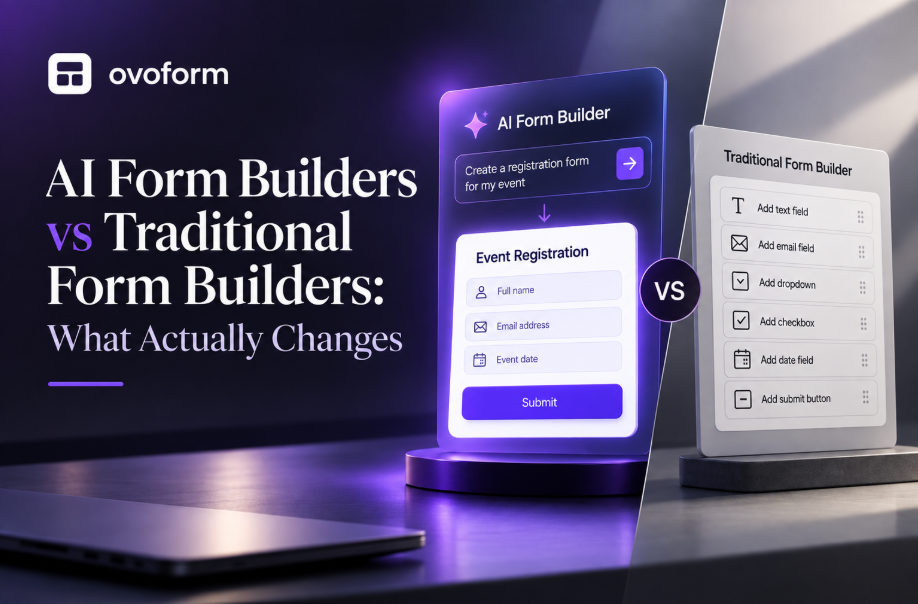
Traditional form builders give users direct control over fields, layouts, logic, and workflows. AI form builders add intelligent assistance that can help create questions, structure forms, improve wording, and sometimes analyse responses or automate parts of the workflow.
So, which approach is better?
The answer depends on what your business needs.
This guide compares AI form builders vs traditional form builders, explains the features that matter, reviews leading AI form-building platforms, and shows when each approach makes sense for your team.
Feature | AI Form Builder | Traditional Form Builder |
Form creation | Prompt-based and manual | Manual or template-based |
Question generation | AI-assisted | Written manually |
Question optimisation | May include AI suggestions | Manual editing |
Conditional logic | Manual and, on some platforms, AI-assisted | Usually manual |
Personalisation | Can be AI-assisted | Usually configured manually |
Response analysis | AI summaries may be available | Dashboard or manual analysis |
Workflow automation | Platform-dependent | Platform-dependent |
Templates | Usually available | Usually available |
Customisation | AI-assisted plus manual control | High manual control |
Setup speed | Generally faster | Generally more time-consuming |
Human review | Recommended | Required |
Best for | Teams creating forms frequently | Teams wanting direct control |
AI form builders reduce the effort involved in planning and creating forms, while traditional builders give users more direct control over the process. For many businesses, the best solution combines both approaches: AI for speed and assistance, with traditional controls for accuracy and customisation.
The way businesses collect information directly affects sales, marketing, customer support, and operations.
A poorly designed form can create unnecessary friction and reduce completion rates. A well-designed form can make it easier to collect accurate information and move submissions into the right workflow.
AI can change the form-building process by reducing repetitive work.
For example, instead of starting with a blank form, a marketer could describe the goal:
"Create a lead qualification form for a B2B software company."
An AI-powered builder may generate an initial structure and suggest relevant questions. The marketer can then review, remove unnecessary fields, adjust the wording, and configure the workflow.
A traditional builder can accomplish the same outcome, but more of the planning and configuration happens manually.
The difference becomes particularly important for teams that create or modify forms regularly.
An AI form builder combines conventional form-building capabilities with artificial intelligence.
Instead of requiring users to create every element manually, AI can assist with tasks such as:
Generating forms from natural-language prompts
Suggesting relevant questions
Rewriting or improving questions
Recommending fields
Creating draft survey structures
Personalising question flows
Summarising responses
Identifying patterns in qualitative feedback
Supporting workflow automation
The exact capabilities vary between platforms.
Traditional form builders, meanwhile, rely primarily on templates, drag-and-drop editors, manual configuration, and predefined automation features.
Neither approach is automatically better.
AI is most valuable when it reduces repetitive work without taking away the user's ability to review and customise the final form.
Choosing between an AI and traditional form builder involves more than comparing AI capabilities. The best platform should improve productivity, fit your existing workflow, and provide room to grow as your business evolves.
Form Creation
Traditional builders typically require users to select fields, write questions, arrange layouts, and configure settings themselves.
AI form builders can accelerate this process by creating a starting point from a description of the desired form.
Traditional workflow:
Choose template → add fields → write questions → configure logic → customise → publish.
AI-assisted workflow:
Describe objective → generate draft → review → customise → configure workflow → publish.
AI doesn't eliminate the need for human input. It reduces the amount of work required to get started.
Question Generation
Writing good questions can take considerable time, particularly for surveys, customer research, and lead qualification forms.
AI can suggest questions based on the purpose of the form and help users create a more complete first draft.
However, generated questions should always be reviewed for relevance, accuracy, tone, and potential bias.
Conditional Logic
Conditional logic displays different questions based on previous responses.
For example, a software company might ask:
Are you currently using a CRM?
If the respondent answers "Yes," the form can ask which CRM they use. If they answer "No," that follow-up question can be skipped.
Both AI and traditional builders can support conditional logic, although the exact implementation varies.
The key advantage of AI is that it may help users plan or configure complex flows faster.
Personalisation
Personalised forms can make the experience more relevant by showing respondents only the questions that apply to them.
AI can assist with creating personalised experiences, but traditional rules and conditional logic remain important because businesses need predictable control over how information is collected.
Response Analysis
Traditional form builders generally provide dashboards, charts, filters, and exports for analysing submissions.
Some AI-powered platforms can go further by summarising written responses, identifying recurring themes, or helping users interpret qualitative feedback.
This can be particularly useful when a business receives hundreds or thousands of open-ended responses.
Workflow Automation
A form becomes significantly more useful when the submission triggers an action.
For example:
Form submission → CRM update → email notification → task creation → follow-up
Automation is not exclusive to AI form builders. Traditional platforms can also provide powerful workflows.
The important consideration is whether the platform integrates with the tools your business already uses.
Integrations
Look for integrations with systems such as:
CRM platforms
Email marketing tools
Google Sheets
Slack
Project management software
Databases
Payment systems
Automation platforms
Tools such as Zapier can also connect form submissions with thousands of external applications.
Templates and Customisation
Templates help businesses launch forms faster.
Customisation allows teams to adjust:
Colours
Typography
Branding
Layouts
Question wording
Confirmation messages
Logic
Workflows
AI can speed up the initial creation process, but strong manual controls remain important for businesses that need a specific brand experience.
Mobile Experience
A form should work well on smartphones, tablets, and desktops.
Look for:
Responsive layouts
Easy-to-tap buttons
Readable text
Fast loading
Simple navigation
Minimal unnecessary scrolling
AI cannot compensate for poor form UX. A well-designed form still needs to be easy for people to complete.
Security and Compliance
Businesses collecting customer, employee, financial, or other sensitive information should evaluate security before choosing a platform.
Consider:
Data encryption
Access controls
Permissions
Data storage
Privacy controls
Compliance requirements
Third-party integrations
Security requirements can vary significantly between industries, so businesses should verify the capabilities and certifications of each platform before purchasing.
AI form builders differ considerably in their target audiences, workflows, integrations, and pricing.
Rather than choosing a platform simply because it has an AI feature, evaluate how well it fits your business processes.
Tool | Best For | Key Features | AI | Automation | Zapier | No-Code | Starting Price |
Ovoform | Automated business forms | AI assistance, workflows, branding | Yes | Yes | Yes | Yes | Free/Paid |
Typeform | Interactive forms | Conversational forms, templates | Yes | Yes | Yes | Yes | Free/Paid |
Jotform | General-purpose forms | Templates, approvals, payments | Yes | Yes | Yes | Yes | Free/Paid |
Fillout | SaaS teams | Logic, Airtable integration | Yes | Yes | Yes | Yes | Free/Paid |
Google Forms | Simple surveys | Collaboration, simplicity | Limited | Basic | Third-party | Yes | Free |
Formstack | Workflow automation | Approvals, documents | Limited | Yes | Yes | Yes | Paid |
Qualtrics | Enterprise research | Analytics, AI insights | Yes | Yes | Yes | No | Custom |
Best for: Startups, SMBs, marketing teams, customer success teams, and businesses that need forms connected to workflows.
Ovoform combines AI-assisted form creation, workflow automation, and branded forms to simplify data collection and business workflows.
Instead of treating a form as a standalone data-collection page, businesses can use it as part of a broader process.
Potential use cases include:
Lead generation
Customer feedback
Onboarding
Internal workflows
Applications
Business processes
Data collection
Why choose Ovoform?
Ovoform is particularly useful for teams that want AI assistance while retaining control over form design, logic, branding, and the workflows triggered after submission.
Best for: Marketing teams, agencies, and businesses focused on interactive customer experiences.
Typeform is known for conversational, interactive forms and offers AI-assisted capabilities alongside its broader form-building platform.
Its approach is particularly suited to businesses that want forms to feel more engaging rather than simply functional.
Why choose Typeform?
Choose it when the respondent experience and conversational presentation are major priorities.
Overview
Best for: Small businesses, HR teams, operations teams, and organisations needing a broad range of form types.
Jotform supports surveys, applications, registrations, payments, approvals, and many other use cases. Its AI capabilities can help users generate forms and accelerate form creation.
Why choose Jotform?
It is a strong option for businesses looking for a versatile form platform with a large ecosystem of templates and integrations.
Best for: SaaS teams, product teams, and operations teams.
Fillout focuses on flexible no-code forms, conditional logic, and integrations with business data sources.
Why choose Fillout?
It can be a good choice for teams that prioritise flexible workflows and integrations in a no-code environment.
Best for: Education, simple surveys, internal questionnaires, and teams already using Google Workspace.
Google Forms remains one of the easiest ways to create a basic form and collect responses.
Why choose Google Forms?
It is particularly useful when simplicity, collaboration, and easy access matter more than advanced form experiences or complex workflows.
Best for: HR, healthcare, finance, operations, and organisations with workflow-heavy processes.
Formstack focuses on forms, documents, approvals, integrations, and business automation.
Why choose Formstack?
It is well suited to organisations that need forms to support structured business processes rather than simply collect information.
Best for: Enterprises, universities, research teams, and organisations conducting advanced experience research.
Qualtrics focuses heavily on experience management, research, analytics, and enterprise requirements.
Why choose Qualtrics?
It is a strong option for organisations that need sophisticated research and customer or employee experience analysis.
Use this simple framework:
Choose an AI Form Builder If:
You create forms frequently.
You want faster form creation.
You want AI-generated questions.
You manage multiple surveys or campaigns.
You analyse large amounts of feedback.
You want to reduce repetitive work.
Choose a Traditional Form Builder If:
You create forms infrequently.
Your forms are simple.
You want complete manual control.
You already have an effective form platform.
You don't need AI-assisted creation.
Choose a Hybrid Approach If:
You want AI assistance but still need manual control.
You need advanced automation.
You want branded forms.
You need conditional logic and integrations.
Multiple teams will create and manage forms.
For many businesses, the hybrid approach provides the best balance: AI to accelerate creation and traditional controls to maintain accuracy and flexibility.
Asking for Too Much Information
Long forms discourage completion. Include only questions that directly support your objective and remove unnecessary fields.
Ignoring Automation Opportunities
If employees have to manually copy every submission into another system, the form may be creating unnecessary work.
Look for integrations and automation that can handle repetitive tasks.
Poor Form UX
A technically powerful form can still perform badly if it is confusing.
Use clear labels, logical question sequences, readable text, and mobile-friendly layouts.
Choosing AI Without Human Review
AI-generated questions can provide a useful starting point, but they should be reviewed before publication.
Check every question for:
Accuracy
Relevance
Clarity
Bias
Tone
Weak Integration Planning
Before choosing a platform, map what happens after someone submits a form.
For example:
Submission → CRM → notification → task → follow-up
Then check whether the platform can support that workflow.
Not Measuring Performance
Track metrics such as:
Form views
Completion rate
Abandonment rate
Conversion rate
Average completion time
Response quality
Use these metrics to improve forms over time.
Keep Forms Focused
Give every form one clear objective to improve completion rates and response quality.
Automate Repetitive Work
Connect forms with your CRM, email platform, spreadsheets, project management system, or other business tools.
Use Progressive Profiling
Instead of collecting every piece of information during the first interaction, collect additional information over time when appropriate.
Test Every Workflow
Submit test responses to confirm:
Conditional logic works
Notifications are delivered
CRM records are created correctly
Integrations work
Confirmation messages display correctly
Automation triggers as expected
Monitor Analytics Regularly
Review form performance regularly and make improvements based on actual respondent behaviour.
✅ Define your form objective
✅ Keep forms concise
✅ Enable conditional logic
✅ Connect CRM integrations
✅ Configure workflow automation
✅ Test every automation
✅ Verify mobile responsiveness
✅ Review analytics regularly
✅ Check security and permissions
✅ Optimize based on user feedback
✅ Monitor completion and abandonment
Choosing between an AI form builder and a traditional form builder isn't about automatically replacing one approach with another.
It's about finding the right balance between speed, control, automation, usability, and scalability.
Traditional form builders remain effective for straightforward forms and teams that prefer complete manual control. AI form builders become more valuable when businesses create forms frequently, need help developing questions, manage complex workflows, or want to reduce repetitive work.
For many organisations, the strongest solution is a platform that combines both approaches: AI to accelerate creation and traditional controls to customise and manage the final experience.
If you're evaluating platforms, consider how each option fits your existing workflows, integrations, security requirements, budget, and future growth.
For businesses looking for AI-assisted form creation combined with branded experiences and workflow automation, Ovoform is worth considering as part of that evaluation.
Create surveys, FAQs, and feedback forms in minutes with Ovoform — no code required.
Get started freeStart building with Ovoform today — free forever, no credit card required.
Get Started For Free