Surveys

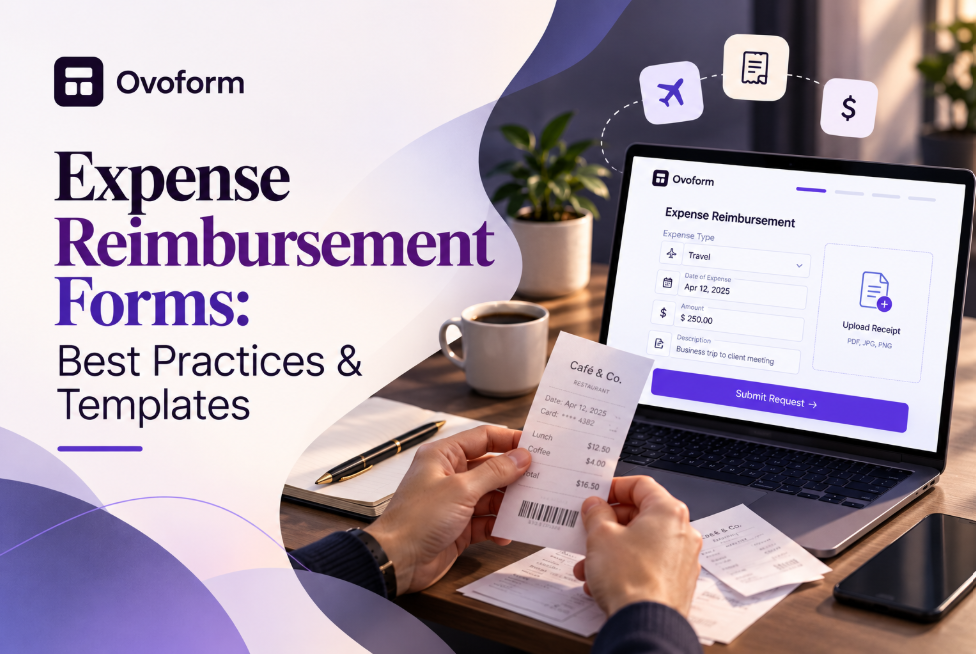
An effective expense reimbursement form can replace scattered emails and spreadsheets with a clear, structured process for submitting and reviewing employee expenses. This guide covers the essential fields to include, receipt and documentation requirements, conditional logic, approval workflows, common mistakes, and practical ways to streamline reimbursements as your business grows.
Nikhil Dogra
October 7, 2026
When Ananya moved from HR generalist to handling finance operations at a fifty-person startup, expense reimbursements were still running through a shared spreadsheet.
Employees would email a photo of a receipt, type the amount into a message, and wait.
For a small team, that was manageable. Then the company hired a sales team that traveled every other week.
Suddenly, Ananya was chasing missing receipts, figuring out which expenses were client-related, and manually entering amounts into accounting software.
The problem wasn't that anyone was careless. The process simply had no structure.
This is what often happens as companies grow. A spreadsheet or email-based reimbursement process may work for a small team, but travel, client entertainment, multiple departments, and increasing expense volume quickly create more work.
A well-designed expense reimbursement form gives employees one place to submit expenses and gives finance the information needed to review each claim.
Instead of collecting an amount, description, and receipt separately, a structured form can capture expense categories, supporting documents, business justification, and approval information in a consistent format.
In this guide, you'll learn what to include in an expense reimbursement form, how to create one, which mistakes to avoid, and how an online form can make the reimbursement process easier to manage.
A basic reimbursement form might ask for an expense amount, a short description, and a submit button.
That may be enough for a simple claim.
But the process becomes more complicated when employees submit different types of expenses, receipts are required, or different spending amounts require different approvals.
Here are some of the most common problems.
Without a receipt upload field, employees may send receipts separately by email or forget them altogether.
Finance then has to match receipts with claims manually.
A receipt submission form should make supporting documentation part of the original submission whenever company policy requires it.
If employees describe expenses entirely through free-text fields, finance has to interpret and categorize every claim manually.
A dropdown with options such as Travel, Meals & Entertainment, Office Supplies, and Client Entertainment creates more consistent data.
A reimbursement process should reflect the company's actual expense policy.
For example, a company might have different limits for meals, transportation, accommodation, and office purchases.
If those rules are not reflected in the form or review process, claims that need additional attention may not be identified until later.
Not every expense needs the same level of review.
A small transportation claim may only require manager approval, while a large client entertainment expense may need additional finance review.
An expense approval workflow can use factors such as expense category and amount to determine which review path applies.
The best reimbursement forms don't ask for every piece of information imaginable. They collect the specific details needed to understand, verify, approve, and record a claim.
Start with basic information such as:
Employee name
Email address
Department
Cost center, when applicable
These fields help finance connect the reimbursement with the appropriate employee and budget.
Use predefined categories instead of asking employees to describe the expense from scratch.
Common categories include:
Travel
Meals and entertainment
Office supplies
Client entertainment
Software or subscriptions
Training and education
Mileage or transportation
The exact categories should match your company's expense policy.
Ask for the date the expense occurred and the exact amount.
Keep the amount as a dedicated field rather than hiding it inside a description. Structured numerical data is easier to review, total, and analyze.
If your company operates across countries, you may also need to capture currency.
A receipt upload field is one of the most important parts of an employee expense form.
Allow employees to attach a photo, PDF, or other accepted document according to your company's requirements.
If receipts are mandatory above a particular amount, make the upload requirement conditional rather than forcing every employee to complete an unnecessary step.
A short explanation can provide important context.
This is particularly useful for meals, entertainment, travel, or expenses that may not be obvious from the receipt alone.
For example:
Client dinner following the quarterly account review.
That is much more useful for a reviewer than simply:
Dinner - $185.
The form should support your existing approval rules.
Depending on your organization, the review process may depend on:
Expense category
Amount
Department
Cost center
Manager
Whether the expense exceeds a policy limit
This is where conditional logic in online forms can make an online expense reimbursement form much more useful.
You don't need to build an expense form completely from scratch.
Ovoform provides a dedicated reimbursement request form template that can be used as a starting point for collecting expense details, receipts, and reimbursement information.
A practical expense reimbursement template can include:
Field | Purpose |
|---|---|
Employee name | Identifies the person requesting reimbursement |
Department | Connects the expense to the correct team |
Expense category | Classifies the expense |
Expense date | Records when the expense occurred |
Amount | Captures the reimbursement value |
Receipt upload | Provides supporting documentation |
Business justification | Explains why the expense was necessary |
Payment or reimbursement details | Provides information required by company policy |
Additional notes | Captures relevant context |
The template should be adapted to your own reimbursement policy.
For example, a company with frequent business travel may need additional travel-related questions, while a small company may only need a few core fields.
The goal is not to create the longest possible form. It is to create a form that collects everything reviewers need without making employees answer irrelevant questions.
You can also browse additional form templates when looking for starting points for other business processes.
Once you've identified the information you need, follow a structured process.
Review previous reimbursement claims and identify the categories employees actually use.
Avoid creating dozens of categories that make the form difficult to navigate.
Four to six clear categories may be enough for many businesses, but your form should reflect your actual expense policy.
Document which expenses require additional review.
For example:
Low-value office supplies → manager review
Travel above a defined amount → manager review
Client entertainment → manager and finance review
Claims above a policy limit → additional review
Use your organization's actual rules rather than copying arbitrary thresholds from another company.
Not every employee needs to answer the same questions.
For example, selecting "Meals & Entertainment" could reveal fields for:
Attendee names
Client or company name
Business purpose
Itemized receipt
Selecting "Travel" could instead display:
Trip purpose
Destination
Travel dates
Mileage or fare
Receipt
This keeps the reimbursement form focused.
Conditional logic is particularly useful when one reimbursement form needs to support several expense categories without becoming unnecessarily long.
If your policy requires receipts for expenses above a certain amount, configure the form accordingly.
The objective is to collect documentation at submission instead of starting an email chain later.
Define what happens after an employee submits a claim.
A simple workflow might look like:
Employee submits claim → Manager reviews → Finance reviews when required → Reimbursement processed
More complex organizations may have different routes depending on department, amount, category, or cost center.
If reimbursement data needs to move into spreadsheets, email systems, accounting tools, or other business applications, consider connecting the form to the tools your team already uses.
Learn more about automating data collection with online forms to understand how form submissions can become the starting point for broader workflows.
Ovoform also supports integrations that can help connect forms with other business tools.
Don't launch the form after testing only one example.
Submit sample claims for different categories and amounts.
Check whether:
Required fields work correctly
Receipt uploads work
Conditional questions appear at the right time
The correct approval path is triggered
Notifications reach the appropriate people
The submission contains everything finance needs
Testing is especially important when several approval rules are involved.
A travel expense form usually requires more context than a standard reimbursement request.
Employees may need to provide:
Destination
Trip purpose
Travel dates
Transportation costs
Accommodation costs
Meals
Mileage
Receipts
Business justification
For example, a sales representative returning from a client visit might submit airfare, hotel, meals, and taxi expenses through the same reimbursement process.
Conditional fields can prevent that employee from seeing questions that are irrelevant to a particular expense category.
This is also why employee expense forms should be designed around real business scenarios rather than simply copying a generic spreadsheet.
Imagine a sales representative returns from a client visit with two expenses:
A $185 client dinner
A $35 taxi ride
The employee submits both through the reimbursement form.
For the dinner, they select Meals & Entertainment. The form asks for the attendees, business purpose, amount, and itemized receipt.
For the taxi, they select Travel. The form asks for the trip details, amount, and receipt.
The company's policy states that meals above a certain amount require additional finance review.
The dinner therefore follows a different approval path from the taxi expense.
The employee doesn't need to remember who should review each claim. The form structure and configured workflow guide the submission.
The exact routing rules will depend on the organization's policies, but the principle is simple: collect the information that determines the decision, then use that information to support the review process.
Expense Type | Key Fields | Typical Review |
|---|---|---|
Travel | Trip purpose, dates, destination, fare or mileage, receipt | Manager approval above defined amount |
Meals & Entertainment | Attendees, business purpose, itemized receipt | Manager approval, finance review when required |
Office Supplies | Item, vendor, amount, cost center, receipt | Manager approval based on policy |
Client Entertainment | Client name, business purpose, amount, itemized receipt | Manager and finance review where required |
Use this table as a starting point rather than a universal policy.
Every company should adjust the fields and approval requirements to match its own rules.
The terms expense reimbursement form and expense report are sometimes used interchangeably, but they can describe different parts of the process.
An expense reimbursement form is typically used by an employee to submit a claim for expenses they have already paid.
An expense report is usually a broader record or summary of expenses, often grouped by employee, trip, period, project, department, or category.
For example, an employee might submit several individual expenses through a reimbursement form during a business trip. Those expenses could later appear together in an expense report.
An expense report template therefore tends to focus more on organizing and summarizing expenses, while a reimbursement form focuses on collecting the information required to process an individual claim.
Understanding the difference can help you decide what your workflow actually needs.
For teams with fewer employees, start simple.
A single form with employee details, expense category, amount, receipt upload, and a short justification may be enough.
The priority should be removing unnecessary email and spreadsheet work without creating a complicated process employees will avoid.
As travel increases, add clearer categories, policy thresholds, and conditional questions.
A structured travel expense form can make it easier to separate transportation, accommodation, meals, and other travel costs.
At this stage, workflow routing can also become more valuable because different expenses may require different reviewers.
Larger teams should consider adding department and cost center information.
This makes it easier to organize reimbursement data by team as well as by expense type.
You may also want to connect the form to other systems so approved information does not have to be manually copied from one tool to another.
Even a well-designed reimbursement form can become ineffective if the process around it is poorly configured.
If company policy requires receipts, make that requirement clear and enforce it where appropriate.
If almost every legitimate expense exceeds the limit, finance will spend too much time handling exceptions.
Review actual historical spending when setting thresholds.
More fields do not automatically produce better data.
Only collect information that employees and reviewers genuinely need.
Travel, meals, office supplies, and client entertainment may require different information.
Use categories and conditional questions where they improve the experience.
Employees often follow up because they don't know what happened to their reimbursement.
Where your workflow supports it, provide confirmation and clear next steps after submission.
Launching the form is not the end of the process.
After employees begin using it, review where problems continue to occur.
Look for:
Frequently rejected claims
Missing documentation
Repeated employee questions
Categories that cause confusion
Approval bottlenecks
Fields employees consistently skip
Claims that require manual follow-up
If one question repeatedly causes confusion, rewrite it.
If a category consistently needs additional information, add a conditional field.
If finance repeatedly asks for the same missing detail, consider making that information part of the form.
This approach turns the reimbursement form into an evolving process rather than a static document.
You can also use automated data collection workflows to reduce repetitive manual steps after submissions are received.
Creating a form manually can still take time, especially when you're starting with a blank page.
An AI form builder can help generate an initial structure from a natural-language description.
For example, you could start with a prompt such as:
Create an employee expense reimbursement form for a company with travel, meals, office supplies, and client entertainment expenses. Require receipts above the company's defined threshold and collect business justification for meals and client expenses.
The AI-generated form should still be reviewed before launch.
Check the questions, categories, required fields, policy rules, approval process, and wording against your actual company requirements.
AI is most useful as a starting point that helps teams move from a blank page to a structured form faster.
For a broader comparison of the approach, see AI form builders vs. traditional form builders.
An expense reimbursement form isn't just paperwork before a payout.
It is the point where the employee's expense, receipt, business justification, company policy, and approval process come together.
A well-designed form captures the right information at the beginning, reduces unnecessary follow-up, and gives finance a more consistent record to review.
The best reimbursement process is not necessarily the one with the most fields or the most complicated workflow.
It is the one that asks the right questions, shows relevant questions at the right time, collects required documentation, and sends each submission through the appropriate review process.
If you're ready to replace spreadsheets and email-based reimbursement requests, start with the reimbursement request form template and customize it around your company's policies and approval requirements
Create surveys, FAQs, and feedback forms in minutes with Ovoform — no code required.
Get started freeStart building with Ovoform today — free forever, no credit card required.
Get Started For Free