Surveys

A well-structured purchase request form can make procurement easier to manage by bringing purchase details, budgets, vendor information, and approvals into one process. This guide covers the essential fields to include, how to set up approval workflows and conditional logic, common mistakes to avoid, and practical ways to streamline purchasing for teams of different sizes.
Nikhil Dogra
October 6, 2026
When Karan took over procurement at a mid-sized manufacturing company, purchase requests were still arriving through email threads.
Someone would request a new laptop or a batch of raw materials, copy their manager, and hope the request eventually reached finance. For a while, the process worked well enough.
Then the company opened a second warehouse and hired two new department heads in the same quarter. Suddenly, Karan was chasing approvals across multiple inboxes and re-entering information into spreadsheets just to track which purchases had been approved.
The problem was not a lack of effort. The company simply had no consistent process for collecting requests, checking budgets, and obtaining approvals.
This is a common challenge for growing businesses. Email-based purchasing may work for a small team, but it becomes difficult to manage as spending, departments, and approval requirements increase.
A purchase request form provides a structured way to collect purchasing details, document business needs, and send requests through the appropriate approval process. When combined with conditional logic, notifications, and suitable workflow automation, it can reduce manual follow-ups and improve spending visibility.
In this guide, you'll learn what a purchase request form should include, how to establish a purchase approval workflow, which mistakes to avoid, and how to streamline procurement without adding unnecessary complexity.
A basic purchase request form might ask for an item name, quantity, and submission confirmation. That may be sufficient for a small, routine purchase, but it often falls short when a request involves budget checks, vendor comparisons, multiple departments, or additional approvals.
Four common problems create unnecessary delays.
A request without a department, cost center, or estimated cost forces finance to ask follow-up questions before evaluating the purchase.
Without this information, approvers may struggle to determine whether the expense fits within the available budget or requires additional authorization. Repeated clarification also makes it harder to forecast departmental spending.
When approval rules are not defined, every request may end up in the same queue. A low-cost office supply order could wait alongside an expensive software purchase requiring IT and finance reviews.
A well-designed purchase approval workflow assigns responsibility based on purchase category, estimated cost, risk, and company policy.
Approvers may need a preferred vendor, quotation, price comparison, or explanation of why a particular supplier was selected. If these details are missing, the request returns to the requester and the process slows down.
A structured vendor request form can capture supplier information and supporting documents at the beginning rather than collecting them through separate email conversations.
When approvals happen through informal conversations or scattered email threads, it becomes difficult to establish who approved a purchase, when the decision occurred, and what information supported it.
A centralized digital record helps procurement and finance teams review decisions, track outstanding requests, and maintain documentation for internal controls.
Effective procurement forms collect the information needed to make a decision without asking every employee to complete unnecessary fields. The exact requirements depend on the organization's purchasing policy and the type of expense.
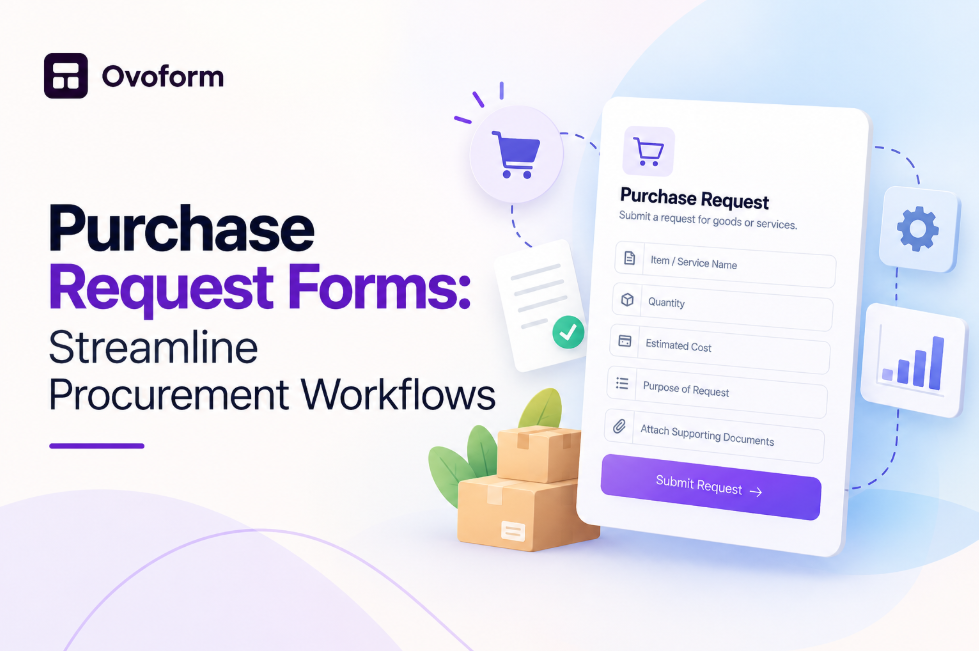
Include the requester's name, department, contact information, and cost center where applicable. These details identify who is responsible for the purchase and which budget should be reviewed.
If employees regularly submit requests on behalf of other teams, include a field identifying the department or budget owner responsible for the expense.
Ask for the product or service name, description, quantity, and intended use. A short business justification helps approvers understand why the purchase is needed.
For software purchases, collect relevant information such as the number of licenses, subscription term, renewal date, intended users, and data access requirements.
Capture the estimated total cost, currency, applicable budget, and whether the expense has already been planned.
Include taxes, shipping, installation, recurring subscription fees, or maintenance costs when relevant. This gives approvers a more realistic view of the financial commitment instead of focusing only on the initial purchase price.
Request the preferred vendor's name and relevant contact details. For purchases above a defined threshold, ask for quotations or a comparison of available suppliers.
A vendor request form may also collect payment terms, delivery estimates, contract details, and the reason for selecting a particular supplier. Only request sensitive or financial information when it is genuinely necessary and handled through an appropriate process.
Include an approval process based on your company's purchasing policy. Supporting documents may include quotations, product specifications, contracts, or statements of work.
Use conditional logic in online forms to display additional questions only when they apply. For example, a high-value purchase might require a quotation upload, while a routine office supply request may need only the item, quantity, and cost center.
The objective is to capture complete information without making every request unnecessarily complicated.
Every procurement process is different, so copying a generic template without reviewing your approval rules can create unnecessary work.
Start by reviewing recent purchase requests. Identify the details finance and managers repeatedly ask for after submission. Missing cost centers, incomplete quotations, unclear business justifications, and absent renewal dates are good examples of fields that may need to be added.
Next, speak with the people who approve purchases most frequently. Ask which request categories create the most delays, what information they need to make decisions, and which expenses require additional review.
Then document your purchasing rules. Establish which roles can approve different spending levels, when finance must be involved, and whether IT, legal, or security teams need to review particular categories.
For example, a software purchase may require an IT security assessment regardless of its cost, while a routine stationery order might need only a manager's approval above a defined limit.
Finally, separate essential fields from optional information. A good form should collect enough detail to support a decision without making every employee complete a lengthy questionnaire.
If you need a starting point, explore Ovoform's form templates for ideas on organizing questions and structuring forms. Adapt any template to your purchasing categories, approval rules, and documentation requirements.
Follow these steps to create a practical purchase request form and establish a more consistent procurement process.
Step 1: Define purchase categories. Start with the categories your company actually uses, such as office supplies, IT equipment, software subscriptions, professional services, and capital expenditure. Avoid creating unnecessary categories that employees will struggle to distinguish.
Step 2: Establish approval thresholds. Define which purchases require manager approval, finance review, or additional authorization. Base thresholds on your company's policies, risk requirements, and budget controls rather than arbitrary amounts.
Step 3: Configure conditional fields. Show quotation uploads, renewal details, contract questions, or security checks only when the selected category or estimated cost makes them relevant. This keeps the form easy to complete while collecting the information needed for complex requests.
Step 4: Collect budget information. Include the department, cost center, estimated total, and business justification. Make essential fields mandatory so requests do not arrive without the information required for review.
Step 5: Configure notifications and routing. Send submissions to the appropriate reviewer based on established rules. If your form platform supports workflow automation, connect submissions to relevant business tools and define what should happen after each decision.
Step 6: Test the process before launch. Submit sample requests for different categories and spending levels. Confirm that the right people receive notifications, required fields appear correctly, and approval decisions are recorded. Test rejected requests and requests that need additional information, too.
An AI form builder can help teams generate an initial form structure more quickly. Review the generated questions, adjust the approval-related fields, and test the complete process before using it for real purchasing decisions.
Imagine a department head needs a new project management tool for a team of 25 employees.
They open the purchase request form and select “Software / SaaS.” The form displays additional questions about license count, subscription term, estimated annual cost, and whether the tool will access sensitive company data.
The requester enters the business justification and attaches a vendor quotation. Based on company policy, the request goes to the department manager for budget approval and to IT for a security assessment. Finance becomes involved if the purchase meets the relevant spending criteria.
The requester does not need to remember every person who should review the purchase. The configured workflow directs the submission to the appropriate reviewers.
This example illustrates how structured fields and routing can reduce avoidable back-and-forth. Actual approval times depend on company rules, reviewer availability, and purchase complexity.
Different purchasing categories require different information. Use this table as a starting point and adapt it to your organization's policies.
Request type | Key fields | Typical review requirements |
|---|---|---|
Office supplies | Item, quantity, vendor, cost center | Manager approval when required by policy |
IT equipment | Device type, business justification, estimated cost | Manager and IT review, where applicable |
Software / SaaS | Tool name, license count, renewal term, data access | Manager, IT, and security review as required |
Capital expenditure | Vendor quote, expected business benefit, budget, useful life | Finance and leadership review, based on policy |
Professional services | Provider, scope of work, estimated fees, contract details | Department owner and relevant finance or legal review |
The goal is not to create a separate form for every purchase. One form with category-based questions may be sufficient when it accommodates your requirements without confusing users.
A purchase request form and purchase order software serve related but different purposes.
A purchase request form captures an internal request and gathers the information needed for authorization. A purchase order is generally created after approval and communicates the purchasing details to a supplier.
Dedicated purchase order software may provide broader capabilities, such as purchase order creation, supplier management, invoice matching, inventory tracking, and financial system integration. An online purchase request form, on the other hand, can help standardize the information collected before a purchase is authorized.
Some organizations use both: a form to initiate the request and procurement or accounting software to manage the subsequent purchasing stages. The right setup depends on purchase volume, compliance requirements, and the tools already in place.
If your main challenge is incomplete requests and unclear approval responsibilities, start by improving the request process. If you also need end-to-end purchasing controls, evaluate whether your existing systems or dedicated approval workflow software can support those requirements.
Small businesses often benefit most from a simple purchase request form with requester details, item information, estimated cost, and a clear approval owner.
Start with a process employees can follow consistently. Avoid adding complex approval stages when the purchasing policy does not require them.
As purchasing volume increases, introduce category-based routing, spending thresholds, and clearer budget information.
Standardized fields make it easier to compare requests and reduce repeated questions. Connecting submissions to existing tools can also reduce manual data entry. For more ideas, see this guide to automating data collection with online forms.
Larger organizations may need sequential approvals, departmental budgets, role-based permissions, and more detailed records.
Document the rules for each approval stage and establish who can authorize exceptions. Test changes carefully so requests do not bypass required checks or become stuck in the workflow.
Regardless of company size, the process should match actual purchasing requirements rather than add complexity for its own sake.
Even a well-designed purchase request form can become ineffective if the process around it is poorly maintained.
Leaving essential budget fields optional: Missing cost centers or estimated totals can delay review.
Making every purchase follow the same approval path: Different categories may require different checks, while low-risk purchases may need fewer approval stages.
Requesting too much information upfront: Irrelevant fields increase effort and make forms harder to complete.
Ignoring vendor documentation: Larger or more complex purchases may require quotations, contracts, or other supporting records.
Failing to communicate status: Without clear status updates, employees may continue sending emails to ask whether their requests have been approved.
Skipping workflow testing: Incorrect routing, missing notifications, or poorly configured conditions can undermine the process.
Ignoring recurring costs: Software renewals and service contracts can create unexpected expenses when renewal dates and ongoing fees are not captured.
Never reviewing the process: Purchasing policies and team requirements change, so forms and routing rules need periodic review.
Review the form with procurement, finance, and frequent requesters. Track incomplete submissions, repeated clarification requests, and approval delays to identify where the process needs improvement.
A well-designed purchase request form becomes more than a way to collect information. It creates a consistent record of what was requested, why it was needed, who reviewed it, and what decision was made.
Requesters know which information to provide. Managers receive requests with the context needed for their decisions. Finance can review spending details without reconstructing every purchase from email conversations.
To reduce manual work further, connect submissions to relevant business systems using form integrations. Depending on the tools and configuration available, this may help teams send notifications, organize records, or pass approved information to the next stage of the purchasing process.
Teams interested in conversational AI workflows can also explore Ovoform MCP, which lets users work with forms through ChatGPT or Claude. This can be useful when creating or updating a form through a conversational prompt is more convenient than building every question manually. Check the available capabilities and configure resulting workflows to match your organization's procurement policies.
Keep the process transparent, review exceptions, and measure whether the new approach is reducing incomplete submissions and unnecessary follow-ups. These indicators help determine whether your procurement process is becoming more consistent over time.
A purchase request form provides the structure needed to connect purchasing needs, budget information, vendor details, and approval decisions in one process.
Start with the fields your team genuinely needs, define approval responsibilities clearly, and use conditional logic to collect additional information only when necessary. Test the workflow before launch and review it regularly as purchasing requirements evolve.
You do not necessarily need to replace your procurement software to improve the initial request process. A well-configured online form can help standardize submissions and support the workflows around them.
For teams looking to build forms without starting from scratch, Ovoform offers AI-assisted form creation and form-building features that can support structured data collection. Evaluate the available workflow and integration capabilities against your own procurement requirements before rolling out the process.
Create surveys, FAQs, and feedback forms in minutes with Ovoform — no code required.
Get started freeStart building with Ovoform today — free forever, no credit card required.
Get Started For Free