Surveys

A well-designed workshop registration form helps organizers collect participant details, manage sign-ups, and prepare for a smoother event experience. This guide covers essential form fields, registration best practices, confirmation and reminder workflows, strategies to reduce no-shows, and practical ways to track attendance while protecting participant information.
Nikhil Dogra
October 14, 2026
A trainer plans a Saturday workshop and hopes to welcome 30 participants. She shares a registration link in a few group chats, asks people to reply with their names, and copies the responses into a spreadsheet at the end of the day.
By Friday, 42 people have expressed interest. On Saturday morning, only 19 arrive. Three people who were never on the list show up, two attendees need vegetarian meals, and several printed certificates have names spelled incorrectly.
The problem is not necessarily a lack of interest. The registration process simply did not give the organizer a reliable way to collect details, confirm attendance, or prepare for the day.
A well-designed workshop registration form can make a real difference. It gives participants the information they need before signing up, collects essential details in one place, and helps organizers manage confirmations and reminders without chasing people individually.
However, a form alone cannot guarantee that every registered person will attend. The best results come from combining a straightforward sign-up process with clear communication and sensible preparation.
Whether you organize an in-person workshop, professional training, a seminar, or a webinar, this guide explains how to create a registration process that works for both participants and organizers.
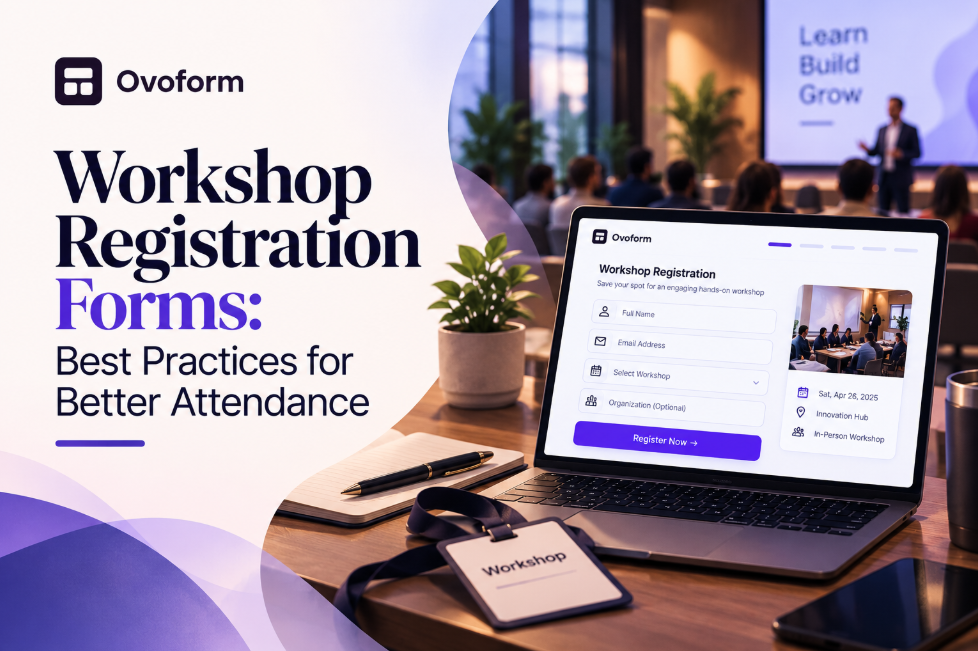
A workshop registration form is an online or paper-based form that allows people to sign up for a workshop, training session, class, seminar, or webinar.
It typically collects a participant's name, email address, selected session, and any additional information needed to organize the event. Depending on the workshop, it may also collect payment details, dietary preferences, experience level, or accessibility requirements.
The form should do more than collect names. It should explain what participants are signing up for, confirm whether their registration was successful, and give organizers a dependable record of expected attendees.
It is also important to distinguish registration from attendance. Someone who completes a form has expressed an intention to attend; they have not necessarily shown up. Keeping registration and actual attendance records separate helps organizers understand turnout and plan future workshops more accurately.
The registration form is often the first practical interaction a participant has with an event organizer. If the process is confusing, requires unnecessary information, or leaves people unsure whether their place is confirmed, some may abandon it.
A poor process can also create work after someone has signed up. Organizers may need to correct incomplete details, answer repeated questions about the venue, or contact participants individually because confirmation messages were never sent.
A clear workshop registration form helps address these problems by providing:
Consistent information: Participant details are collected in a standard format instead of being scattered across messages and spreadsheets.
Clear expectations: Attendees can check the date, time, location, price, and requirements before registering.
Better preparation: Organizers can estimate attendance and plan materials, seating, refreshments, and staffing.
Simpler communication: A reliable attendee list makes it easier to send updates, reminders, and follow-up messages.
Useful records: Comparing registrations with actual attendance helps organizers identify patterns and improve future events.
The goal is not to collect as much information as possible. It is to collect the right information at the right time.
The fields you need depend on the audience, format, and purpose of the workshop. A free 45-minute webinar may require only a few details, while a two-day corporate training session may need additional information for scheduling and logistics.
Use this checklist as a starting point.
Field | When to include it |
|---|---|
Full name | For identifying participants and preparing attendance records |
Email address | For registration confirmations and event updates |
Phone number | When time-sensitive communication is necessary |
Workshop date or session | When participants can choose between multiple sessions |
Organization or job role | For professional training where this information is useful |
Experience level | When content or activities differ by participant experience |
Dietary requirements | For events providing meals or refreshments |
Accessibility requirements | When organizers need to arrange suitable accommodations |
Payment information | For paid workshops, using an appropriate payment process |
Consent or acknowledgment | When participants must agree to relevant terms or policies |
Do not make every field mandatory. If the organizer does not need a phone number, job title, or detailed background information, leave it out.
For example, asking a person registering for a free introductory webinar to provide their company size, job title, phone number, and years of experience may create unnecessary friction. A short form is often more appropriate.
If the workshop has different attendance options, use clearly labelled choices. Conditional logic can display relevant questions only when needed—for example, showing dietary questions to in-person participants but not to people attending remotely.
Every question should have a clear purpose. Ask yourself whether the answer will help you organize the workshop, communicate with participants, or improve the session.
Use simple labels and avoid asking for the same information twice. If participants select a workshop date at the beginning, there is usually no reason to ask them to enter it again in a separate field.
Before asking people to register, clearly display:
Workshop title and intended audience
Date, time, and duration
Venue address or online joining arrangements
Registration fee, if applicable
What participants will learn
Any preparation or materials required
People should not have to submit the form before discovering when the workshop takes place or whether it meets their needs.
For recurring workshops, make the selected date and time particularly clear. This reduces accidental registrations for the wrong session.
A participant should know whether their sign-up was successful. A confirmation email can include the workshop date, time, venue or joining link, contact details, and any instructions for preparing in advance.
For events with limited capacity, explain whether the participant has secured a place or is waiting for approval. Do not treat an expression of interest as a confirmed booking.
If registrations require manual approval or payment, make that status clear rather than sending a message that implies the place is already guaranteed.
People often register well before an event and forget about it as the date approaches. A reminder a few days beforehand, followed by a shorter reminder closer to the start time, can help participants plan.
Include the information they need to act: the date, start time, location or joining link, and anything they should bring.
For workshops where plans change frequently, provide a way to cancel or request a change. This gives organizers an opportunity to offer an available place to someone on a waitlist.
Reminders can help reduce missed attendance, but they are not a guarantee. Scheduling conflicts, emergencies, travel difficulties, and other circumstances still affect turnout.
For in-person workshops, the room size, equipment, and trainer-to-participant ratio may limit the number of attendees.
Set a realistic registration limit and review it against the venue's actual capacity. If demand exceeds the available places, consider a waitlist and explain how participants will be contacted if a space opens.
Do not advertise a specific number of remaining seats unless the system can keep that information accurate. Misleading scarcity can damage trust rather than improve registrations.
Participants may open a sign-up link from email, a messaging app, or social media. The form should be easy to read and complete on a phone.
Test the full experience, including dropdowns, required fields, payment steps, and the confirmation screen. Make sure buttons are easy to tap and that the form does not require unnecessary scrolling.
Some workshops need to accommodate different experience levels, languages, accessibility requirements, or learning preferences.
Ask only for the details necessary to make those arrangements. Explain why sensitive information is being requested and limit access to the people responsible for organizing the event.
When participants can choose between in-person and online attendance, use separate instructions for each option so they receive the correct venue details or joining link.
A company is organizing a two-day communication workshop for employees from several departments. Its training registration form collects each participant's name, work email, department, and selected session.
The confirmation includes the venue, start time, and preparation instructions. The organizer reviews the attendee list before the workshop and uses the final numbers to arrange seating and materials.
The process works because each field serves a practical purpose and participants know what happens after they register.
A college is arranging a career guidance seminar with limited seating. The registration form collects the student's name, course or class, and preferred session.
The organizer uses the list to plan room capacity and prepare attendance records. If students are under the age of consent for particular data collection, the institution should follow its applicable safeguarding and consent requirements.
An educator hosts a free webinar for people across different time zones. The form collects names and email addresses, while the confirmation provides the scheduled time and joining instructions.
A reminder is sent before the webinar, and the organizer records attendance separately from registrations. After the session, a follow-up message can share resources or a recording where appropriate.
These examples illustrate why one registration template will not suit every event. The form should reflect the actual decisions the organizer needs to make.
A large number of registrations does not automatically translate into a full room. To understand where attendance is being lost, track the process from sign-up to arrival.
Start by distinguishing between registrations, cancellations, and actual attendance. If 50 people register, five cancel in advance, and 30 attend, the organizer should not treat all 20 absences as unexplained no-shows.
A few practical measures can help:
Send a confirmation immediately after a successful registration.
Include the event in participants' calendars where practical.
Send timely reminders with clear joining or venue details.
Make cancellation straightforward so organizers can offer places to others.
Use a waitlist when the workshop has a genuine capacity limit.
Ask participants for brief feedback after the event to understand barriers to attendance.
For paid workshops, clear payment and refund terms can help set expectations. However, charging a fee is not automatically the best way to improve attendance; it may also discourage people who would otherwise benefit from the session.
After the event, compare the number of registrations with actual attendance. If many people register but few attend, review the timing, reminder schedule, event description, and registration experience before assuming the audience lacks interest.
Once you know what information to collect, set up a process that is easy to maintain.
Step 1: Define the requirements. Decide who the workshop is for, how many participants you can accommodate, and which details you need before the event.
Step 2: Create the form. Start with the essential fields, use clear descriptions, and remove questions that do not support a real decision. Review available form features if you need customization or specific form behaviour.
Step 3: Test the participant experience. Complete a test registration on desktop and mobile. Check that the right details appear, required fields work, and the confirmation message is accurate.
Step 4: Organize the attendee list. Keep registration records in one place and establish who is responsible for updates, cancellations, and participant questions.
Step 5: Plan communication. Prepare confirmation messages, reminders, and any last-minute event updates. If your workflow depends on connecting registration data to other tools, review the available integrations and confirm that they support your intended process.
Step 6: Review the results. After the workshop, record actual attendance, note recurring problems, and make changes before the next session.
A form builder such as Ovoform can help organizers create and customize a digital registration form without starting from a blank page. Before choosing a platform, verify that its available features match your needs, particularly for payment processing, waitlists, automated reminders, and capacity management.
A registration process should become more useful with experience. Instead of judging success only by the number of people who submit the form, review a few measures after each workshop.
Registration completion: How many people who begin the sign-up process finish it? A complicated form may be one reason for a high drop-off rate, although traffic quality and event appeal also matter.
Attendance rate: How many eligible registrants actually attend? Use a consistent definition and account for cancellations when interpreting the result.
Cancellation and waitlist activity: How many participants cancel, and are vacant places successfully offered to others?
Administrative effort: How much time does the team spend correcting details, answering routine questions, and preparing attendee lists?
Participant feedback: Did people find the registration process clear? Were the instructions sufficient? Was anything important missing?
Review these measures alongside feedback from the trainer and participants. For example, a high attendance rate does not necessarily mean the form was easy to use, and a low attendance rate does not prove that reminders were ineffective.
If you collect responses digitally, Ovoform's analytics may help you review available response data, depending on your setup. Use the results to make specific improvements rather than changing the entire process after a single event.
Registration forms can collect personal information, including names, email addresses, phone numbers, dietary requirements, and accessibility needs. Organizers should handle these details carefully.
Collect only what is necessary, explain how the information will be used, and limit access to people who need it for workshop administration. Avoid sharing attendee lists publicly or retaining personal details indefinitely without a clear reason.
For workshops involving schools, minors, healthcare, or other sensitive settings, additional privacy, consent, or safeguarding requirements may apply. Follow the relevant rules for your organization and location.
If your workshop uses third-party tools for communication, payments, or record keeping, understand what information is shared with those services and how access is managed.
A workshop registration form is a small part of event planning, but it influences how smoothly everything else runs. A clear form helps participants understand what they are signing up for and gives organizers the information needed to prepare properly.
Start with the essential fields, explain the event details upfront, and provide clear confirmation and reminders. Keep attendance records separate from registration numbers, and use cancellations and feedback to improve future sessions.
Most importantly, design the process around the people using it. When participants can sign up easily and organizers know what to expect, it becomes much easier to deliver a workshop that feels well planned from the first registration to the final session.
Create surveys, FAQs, and feedback forms in minutes with Ovoform — no code required.
Get started freeStart building with Ovoform today — free forever, no credit card required.
Get Started For Free