Surveys

A well-designed insurance claim form can make the claims process faster, simpler, and less frustrating for both customers and insurance teams. Learn how to create effective digital claim forms with conditional logic, document uploads, mobile-friendly design, automated workflows, and clear submission processes that help reduce errors, improve data quality, and speed up claims processing.
Riya Sharma
September 24, 2026
Picture this. Someone's car just got hit in a parking lot. They are stressed and want the claim process to be as simple as possible.
They open your insurance claim form expecting a five-minute task. Instead, they find a long form asking for information that may not apply to their situation, confusing fields, and no clear explanation of what happens after submission. They may abandon the form and call your support team instead.
A well-designed insurance claim form can prevent this. It guides customers through the process, asks only relevant questions, collects the information claims teams need, and provides clear next steps after submission.
In this guide, we'll explain what makes an insurance claim form effective, the common problems that slow claims down, and the best practices for creating faster, easier digital claim forms. We'll also look at examples across different insurance types and how no-code tools like Ovoform can help automate the process.
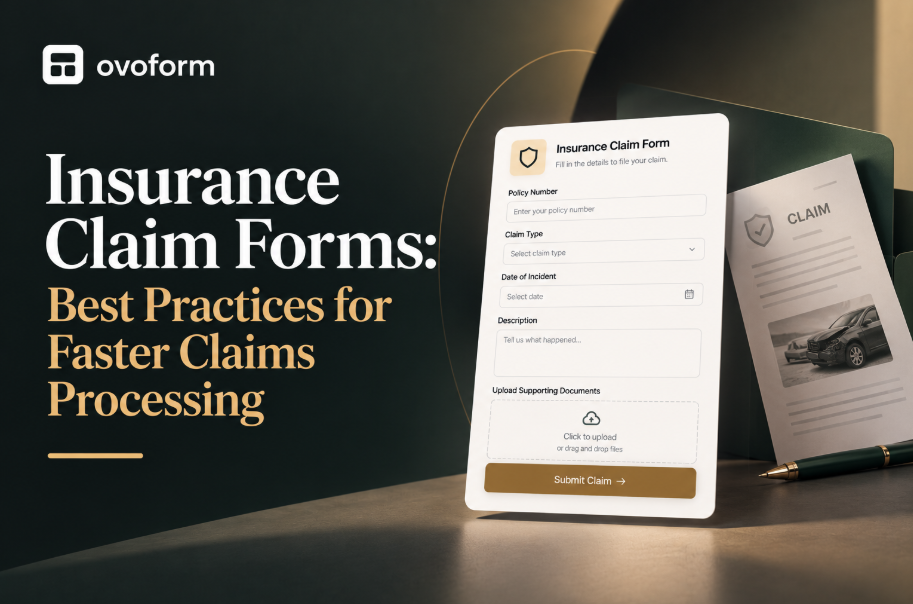
An insurance claim form is the document, digital or paper, that a policyholder fills out to request payment or service after a covered loss. It usually collects policy details, incident information, supporting documents, and a description of what happened.
An insurance claim form typically collects policyholder details, policy information, the date and location of the incident, a description of the loss, supporting documents, and other information needed to evaluate the claim. The exact fields depend on the type of insurance and the nature of the loss.
For many customers, the claim form is one of their first interactions with an insurance company after something has gone wrong. A delayed flight, flooded basement, car accident, or hospital visit can already be stressful. A confusing form can make the experience even harder.
That is why claim form design matters. A good form should make it easy for customers to provide accurate information without asking them to navigate unnecessary questions.
An insurance claim form is the document, digital or paper, that a policyholder fills out to request payment or service after a covered loss. It usually collects policy details, incident information, supporting documents, and a description of what happened.
An insurance claim form typically collects policyholder details, policy information, the date and location of the incident, a description of the loss, supporting documents, and other information needed to evaluate the claim. The exact fields depend on the type of insurance and the nature of the loss.
For many customers, the claim form is one of their first interactions with an insurance company after something has gone wrong. A delayed flight, flooded basement, car accident, or hospital visit can already be stressful. A confusing form can make the experience even harder.
That is why claim form design matters. A good form should make it easy for customers to provide accurate information without asking them to navigate unnecessary questions.
Before looking at solutions, it helps to understand what typically goes wrong with traditional claim forms.
One form trying to do everything. Auto claims, health claims, and property claims can get squeezed into the same generic template, so the form does not fit each situation well.
No logical flow. Questions may be ordered around an insurer's internal process rather than the way a customer naturally thinks about their situation.
Missing document upload options. Customers may be asked to email photos, receipts, or reports separately instead of attaching them directly to the claim.
No confirmation or status updates. After submission, customers may not know whether their claim was received or what happens next.
Desktop-only design. A form that is difficult to complete on a phone creates unnecessary friction, especially when customers are submitting a claim immediately after an incident.
Too many unnecessary fields. Asking for information that does not apply to a particular claim makes the form longer and increases the chance of incomplete submissions.
Start by identifying the type of claim and use conditional logic to show questions based on the customer's answers. A theft claim may require a police report number, while a medical claim may require provider details. Customers should not have to answer questions that do not apply to their situation.
Let customers upload photos, receipts, reports, and other supporting documents during the relevant part of the form rather than creating a separate follow-up process.
Replace confusing industry terminology with language customers can understand. Clear questions reduce misunderstandings and make it easier for customers to provide accurate answers.
For longer claim forms, a progress indicator can help customers understand how much of the process remains and reduce uncertainty about the time required.
After submission, provide a confirmation message or email that confirms receipt and explains what happens next. Where appropriate, include an expected timeline or next step.
Use routing rules to send claims to the appropriate team based on information such as claim type, amount, or other defined criteria.
Customers may begin a claim on a phone, so fields, buttons, uploads, and navigation should work well on smaller screens.
Use field validation for information such as email addresses, dates, policy numbers, and required documents so customers can correct errors before submitting a claim.
A customer selects "Accident" as the claim type. The form can then ask for the other driver's details, photos of the damage, and whether a police report was filed. A customer reporting a stolen vehicle can instead see questions about the police report and last known location.
The form can first ask whether the claim relates to a hospital stay or an outpatient visit. Hospital claims may require admission and discharge dates, while outpatient claims can focus on the treatment date and provider details.
A homeowner reporting water damage may be asked about the source of the leak and whether emergency repairs were made. Someone reporting a break-in can instead provide information about stolen items and a police report.
A customer claiming for a cancelled flight may need airline confirmation and the reason for cancellation. A lost-luggage claim may require the airline's claim reference and information about the missing items.
A beneficiary claim requires sensitive information and clear guidance. The form should request only the information needed at each stage and explain what happens after submission to reduce unnecessary back-and-forth.
Traditional paper claim forms often require manual data entry, separate document submission, and follow-up through phone or email. Digital insurance claim forms can collect structured information, accept file uploads, use conditional logic, and provide immediate confirmation after submission.
Digital forms can also make it easier for claims teams to route submissions and identify incomplete information before review. For customers, a mobile-friendly online claim form provides a more convenient way to submit information without printing or mailing paperwork.
Making every field mandatory. Some information may be optional depending on the claim. Requiring unnecessary fields can frustrate customers and increase abandonment.
Overloading the form with legal text. Required disclosures should remain accessible, but they should be presented clearly without unnecessarily interrupting the form flow.
Ignoring analytics. If many users abandon the form at the same question, it may indicate that the question or instructions need improvement.
Forgetting to test every path. A claim form with multiple branches should be tested across every possible path, not just the most common one.
Asking for the same information twice. Repeated questions make the form feel longer and can lead to inconsistent answers. Reuse information where appropriate.
Map your claim types. List the types of claims your organisation handles and the information each one requires.
Separate common and specific questions. Identify which questions apply to every claim and which only apply to certain situations.
Add conditional logic. Build the form so customers see only the questions relevant to their claim.
Add document uploads. Allow customers to attach photos, receipts, reports, and other required evidence.
Set up routing rules. Route submissions based on factors such as claim type, amount, or other defined criteria.
Test every path. Test the complete form on both desktop and mobile, including every conditional branch.
Monitor and improve. Review completion and drop-off data to identify areas where customers may be experiencing friction.
Platforms like Ovoform make this process visual and code-free. Teams can start with form templates, build conditional forms, connect automated email confirmations, and use form integrations to route submissions and connect them with other business tools without requiring a developer to build the form from scratch.
AI can help insurance teams create and improve claim forms faster by turning requirements into structured questions and form flows. Instead of building every field manually, teams can use AI-assisted form creation to generate an initial claim form and then refine its questions, wording, and logic.
AI can also help identify repetitive questions, simplify confusing language, and suggest relevant fields based on the information a form needs to collect. Combined with conditional logic and automated workflows, AI-assisted form building can reduce the time required to create and maintain digital claim forms.
With an AI-powered form builder like Ovoform, teams can start with a simple description of the form they need and refine the generated form before publishing it.
For teams that prefer working through AI assistants, Ovoform MCP enables them to create and manage forms through conversational prompts in tools such as Claude and ChatGPT.
An insurance claim form is more than a way to collect information. It is an important part of the customer experience and can influence how efficiently a claim moves through the process.
The most effective claim forms ask relevant questions, collect complete information, support document uploads, work well on mobile devices, and provide clear next steps. With conditional logic, automation, analytics, and AI-assisted form creation, insurance teams can build a smoother process for both customers and claims staff.
Create surveys, FAQs, and feedback forms in minutes with Ovoform — no code required.
Get started freeStart building with Ovoform today — free forever, no credit card required.
Get Started For Free