
Surveys

A better maintenance process starts with better reporting. See how digital maintenance request forms help teams capture complete issue details, prioritise urgent repairs, automate assignments and notifications, track progress, and spot recurring problems. The guide also explores 15 practical examples and how AI can support predictive maintenance and smarter facility management.
Nikhil Dogra
September 23, 2026
It was barely 8 a.m. when David, the facilities manager for a busy office complex in Manchester, unlocked his laptop.
Before he'd even taken his first sip of coffee, the day's maintenance requests had already started arriving.
An employee emailed about flickering lights in Meeting Room B.
Reception forwarded a voicemail from a tenant reporting a leaking pipe.
A warehouse supervisor sent a photo of a damaged loading bay through WhatsApp.
Someone else stopped David in the corridor to mention that one of the lifts had been making strange noises all week.
By midday, there were more than twenty maintenance issues waiting to be dealt with.
The real problem wasn't the number of repairs.
It was that every request had arrived through a different channel.
Some included photos.
Some didn't mention the location.
Others lacked enough information for technicians to understand what was wrong before arriving on site.
One urgent plumbing issue remained buried in an overflowing inbox until the following afternoon, turning a small leak into a much bigger repair.
Now imagine a different morning.
An employee notices the leak, opens a maintenance request form on their phone, selects "Plumbing", chooses the building and room number, uploads two photos, marks the request as High Priority, and submits it.
Within seconds, the facilities team receives an alert.
The request is automatically assigned to the plumbing contractor, the employee receives a confirmation email, and the issue appears on the maintenance dashboard with every detail needed to begin work immediately.
No searching through emails.
No missing information.
No confusion over priorities.
Just faster repairs and smoother facility management.
Whether you're managing an office building, school, hospital, hotel, warehouse, manufacturing site or residential property, maintenance request forms help transform reactive maintenance into an organised, efficient workflow.
In this guide, you'll discover how digital maintenance request forms improve communication, reduce response times, streamline facility management, and create a better experience for both maintenance teams and the people they support.
Every building needs maintenance.
Whether it's replacing faulty lighting, repairing HVAC systems, fixing plumbing issues or scheduling routine inspections, maintenance is an essential part of keeping facilities safe and operational.
Yet many organisations still rely on emails, phone calls, spreadsheets or even handwritten notes to report problems.
The result?
Requests get lost.
Important details are missing.
Technicians arrive without the right equipment.
Simple repairs take longer than they should.
A digital maintenance request form solves these problems by standardising how issues are reported.
Instead of chasing information, maintenance teams receive complete, organised requests that can be prioritised and assigned immediately.
A well-designed maintenance request form helps organisations:
Report maintenance issues consistently
Reduce response times
Capture complete information
Prioritise urgent repairs
Improve communication between staff and maintenance teams
Reduce paperwork
Track maintenance history
Increase operational efficiency
For facilities managers, this means spending less time managing requests—and more time resolving them.
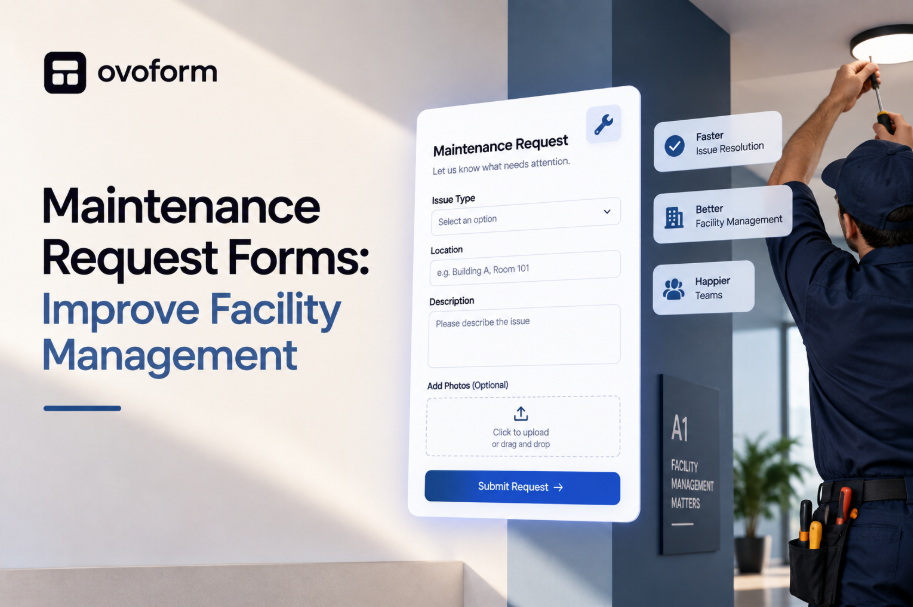
A maintenance request form is a digital form used to report maintenance issues, repair requests and facility-related problems in a structured format.
Instead of relying on scattered emails or phone calls, employees, tenants, students or residents submit all the required information through a single form.
A typical maintenance request form collects:
Requester's details
Building or property location
Room or asset number
Maintenance category
Description of the issue
Priority level
Photos or supporting documents
Preferred access time
Additional notes
Because every request follows the same format, facilities teams can assess problems faster, assign the correct technician and keep everyone informed throughout the repair process.
If your maintenance team spends more time organising requests than completing repairs, it may be time to rethink your process.
Here are a few warning signs:
Employees report issues through multiple channels.
Important requests are accidentally overlooked.
Technicians arrive without enough information.
Staff repeatedly ask for updates.
Maintenance history is difficult to track.
Emergency repairs aren't prioritised properly.
Paper forms and spreadsheets still manage daily operations.
If any of these sound familiar, introducing a digital maintenance request form can significantly improve both efficiency and communication.
Different facilities face different maintenance challenges. A university campus doesn't handle repairs in the same way as a hotel or manufacturing plant.
That's why maintenance request forms should be tailored to the environment they're support.
Here are fifteen practical examples used across different industries.
Employees can quickly report issues such as:
Broken desks
Faulty lighting
Air conditioning problems
Damaged doors
Meeting room equipment failures
Ideal for corporate offices and business parks.
Allows tenants to report:
Plumbing leaks
Heating failures
Electrical faults
Appliance breakdowns
Security concerns
Helping property managers respond faster while keeping tenants informed.
Hotel staff can submit requests for:
Guest room repairs
Lift faults
Plumbing issues
Air conditioning failures
Furniture damage
Ensuring guests experience minimal disruption.
Teachers and staff can report:
Classroom equipment issues
Broken furniture
Heating problems
Roof leaks
Playground repairs
Helping schools maintain safe learning environments.
Designed for healthcare organisations where maintenance requests often require rapid response and compliance tracking.
Collect details about:
Medical equipment faults
Lighting
HVAC
Plumbing
Emergency repairs
Warehouse teams can report:
Loading bay damage
Shelving repairs
Roller shutter faults
Safety hazards
Forklift maintenance
Reducing downtime and improving workplace safety.
Used to report:
Machine failures
Production line issues
Equipment servicing
Preventive maintenance
Operational faults
Helping reduce costly production delays.
Perfect for reporting:
Heating failures
Air conditioning issues
Ventilation problems
Temperature inconsistencies
Ensuring technicians receive the right information before attending the site.
Collect reports for:
Power failures
Faulty sockets
Lighting repairs
Circuit issues
Electrical safety concerns
Ideal for:
Burst pipes
Water leaks
Blocked drains
Broken toilets
Low water pressure
Every facility is different, and so are its maintenance needs. A hotel prioritises guest comfort, while a manufacturing plant focuses on minimising equipment downtime. The key is using a maintenance request form that's tailored to your environment.
Here are practical examples.
Employees can report:
Faulty lighting
Broken desks or chairs
Air conditioning issues
Printer or meeting room equipment faults
Damaged doors and locks
Best for: Corporate offices, co-working spaces and business parks.
Perfect for landlords and property managers.
Tenants can submit requests for:
Plumbing leaks
Heating failures
Broken windows
Electrical problems
Pest issues
Adding photo uploads helps property managers assess repairs before arranging a visit.
Hotels rely on quick repairs to maintain guest satisfaction.
Common requests include:
Air conditioning repairs
Bathroom maintenance
Television faults
Furniture damage
Lift issues
Housekeeping staff can report problems immediately after room inspections.
Schools need an organised way to report maintenance issues without disrupting learning.
Examples include:
Broken classroom furniture
Heating problems
Playground equipment repairs
Roof leaks
Whiteboard replacements
Hospitals require rapid maintenance response to protect patient safety.
Typical requests include:
Medical equipment faults
Oxygen system issues
Emergency lighting
HVAC repairs
Plumbing failures
Priority levels are particularly important in healthcare environments.
Warehouse teams frequently report:
Damaged shelving
Loading bay repairs
Roller shutter issues
Forklift maintenance
Safety hazards
Fast reporting helps reduce operational delays.
Production facilities use maintenance forms to report:
Machine breakdowns
Conveyor belt faults
Hydraulic leaks
Equipment servicing
Preventive maintenance schedules
Collect details such as:
Poor airflow
Temperature problems
Strange noises
Water leaks
Air conditioning failures
Including equipment numbers helps technicians prepare before arriving.
A maintenance request form is only as effective as the information it collects.
When requests arrive incomplete, technicians spend valuable time chasing missing details instead of fixing the problem.
Every maintenance request form should include the following sections.
Requester Details
Include:
Full name
Department
Email address
Phone number
This allows maintenance teams to ask follow-up questions if required.
Exact Location
One of the biggest causes of delayed repairs is vague location information.
Instead of asking only for a building name, collect:
Building
Floor
Room number
Department
Asset ID (where applicable)
Maintenance Category
Help users classify the problem.
Examples include:
Electrical
Plumbing
HVAC
Furniture
Building Repairs
Cleaning
Security
IT Equipment
This allows requests to be routed automatically.
Detailed Description
Encourage users to explain:
What happened?
When did it start?
Is the issue getting worse?
Does it affect operations?
Specific descriptions help technicians arrive prepared.
Priority Level
Not every repair requires the same urgency.
Offer options such as:
Low
Medium
High
Emergency
This helps facilities teams allocate resources more effectively.
File Uploads
Allow users to attach:
Photos
Videos
Inspection reports
Equipment documentation
Visual information often speeds up diagnosis.
Preferred Access Time
Especially useful for:
Offices
Hotels
Residential properties
Schools
Users can specify when technicians can safely access the area.
People should be able to report an issue in under two minutes.
Avoid unnecessary questions that delay submissions.
Many maintenance requests are submitted while employees are walking through a building or inspecting equipment.
A responsive mobile form encourages immediate reporting.
If someone selects Electrical, there's no need to ask plumbing-related questions.
Conditional logic keeps forms short and relevant.
Photos reduce guesswork and help technicians bring the right tools and replacement parts.
Send:
Confirmation emails
Technician notifications
Status updates
Completion confirmations
Keeping everyone informed improves transparency.
Assign maintenance requests based on:
Issue category
Building
Priority
Department
This removes manual sorting.
Let requesters see whether their issue is:
Received
Assigned
In Progress
Completed
This reduces unnecessary follow-up calls.
Connect forms to:
CMMS platforms
Helpdesk software
Asset management systems
Facility management tools
This eliminates duplicate data entry.
Use reporting to identify:
Frequently failing equipment
Recurring issues
Average response times
High-maintenance areas
Data helps improve long-term planning.
Facility requirements change over time.
Update categories, remove unnecessary fields, and improve workflows based on feedback from both technicians and staff.
Facility management has evolved far beyond spreadsheets, paper forms, and reactive repairs.
Today, AI and automation are helping maintenance teams identify problems earlier, assign work faster, and make smarter decisions based on real-time data.
Instead of waiting for someone to report a fault, modern systems can detect patterns that indicate equipment is likely to fail. Combined with digital maintenance request forms, these technologies help organisations move from reactive maintenance to proactive facility management.
Some of the most valuable AI-powered capabilities include:
Predictive Maintenance
AI analyses maintenance history, equipment usage, and sensor data to predict when assets are likely to require servicing.
This helps reduce unexpected breakdowns and extends equipment lifespan.
Intelligent Work Order Routing
Rather than manually assigning every request, AI can automatically route maintenance tickets to the most suitable technician based on:
Skill set
Location
Availability
Workload
Priority level
The result is faster response times and more balanced workloads.
Automatic Priority Detection
Not every maintenance request has the same urgency.
AI can identify keywords such as:
Flood
Gas leak
Smoke
Electrical hazard
Lift failure
and automatically flag them as high priority, ensuring critical issues receive immediate attention.
Maintenance Analytics
AI can analyse thousands of maintenance requests to uncover trends like:
Frequently failing equipment
Buildings with the highest maintenance costs
Average response times
Seasonal maintenance patterns
Common repair categories
These insights help facilities managers make more informed decisions about budgeting, staffing, and preventive maintenance.
Smarter Communication
Automation keeps everyone informed without additional administrative work.
Employees receive confirmation when a request is submitted, technicians are notified instantly, and requesters receive updates as work progresses.
This creates a smoother experience for everyone involved.
Paper forms and email-based reporting may have worked in the past, but they often create unnecessary delays and confusion.
Digital maintenance request forms bring every stage of the process into one organised workflow.
Instead of juggling spreadsheets, inboxes, and handwritten notes, facilities teams can:
Capture complete maintenance requests
Upload supporting photos and documents
Assign work automatically
Track repair progress in real time
Maintain a searchable maintenance history
Generate reports for audits and planning
The result is greater visibility, better collaboration, and faster issue resolution.
Why Businesses Choose Smart Form Builders
The most effective maintenance request forms don't just collect information—they become part of a larger facility management workflow.
Platforms like Ovoform allow organisations to create branded maintenance request forms with AI builder, conditional logic, file uploads, automated notifications, approval workflows, and integrations with the tools they already use.
Whether you're managing a single office or multiple facilities across different locations, digital forms help standardise maintenance reporting while reducing administrative effort.
Instead of chasing missing information, your team can focus on resolving issues and keeping facilities running efficiently.
Every maintenance issue starts with someone noticing that something isn't working as it should. The speed and quality of the response often depend on how that issue is reported.
A well-designed maintenance request form creates a clear, consistent process for capturing the right information from the very beginning. It reduces confusion, speeds up repairs, improves communication, and gives facilities teams the visibility they need to manage maintenance more effectively.
Whether you're responsible for a commercial office, school, healthcare facility, manufacturing plant, hotel, or residential property, moving from scattered emails and paper forms to a structured digital workflow can make a measurable difference.
Small improvements in the reporting process often lead to faster repairs, lower maintenance costs, and a better experience for everyone who uses your facilities.
Create surveys, FAQs, and feedback forms in minutes with Ovoform — no code required.
Get started freeStart building with Ovoform today — free forever, no credit card required.
Get Started For Free